
Summary
The purpose of this webpage is to guide taxpayers in registering, completing, and submitting Turnover Tax to meet their tax obligations and minimize administrative effort.
Turnover Tax was established for micro businesses with an annual qualifying turnover not exceeding R1 million and has been effective for years of assessment beginning on or after 1 March 2009.
The implementation of Turnover Tax is part of the Government’s policy to support entrepreneurship and create conditions that aim to enhance the profitability, sustainability, and growth of micro businesses.
All section references in this guide pertain to the Income Tax Act No. 58 of 1962 and its Sixth Schedule, unless expressly indicated otherwise. Any references to other Acts will be clearly specified and for further details, refer to the Draft Tax Guide for Micro Businesses, available on the SARS website (www.sars.gov.za).
How to Obtain Turnover Tax (TT01) Application Form
To support the goal of streamlining interactions with SARS and to regulate the number of taxpayers visiting SARS Branch Offices, the SARS Online Branch eBooking system was created. This system allows taxpayers, tax practitioners, and representatives to schedule telephonic or video appointments via Microsoft Teams, or to book in-person appointments with a SARS Service Consultant at a Branch Office for a future date.
- To register as a micro business for Turnover Tax tax type, a TT01 application form must be completed in full.
- Note: certain fields are mandatory and if not completed will result in the automatic rejection of the application.
Currently there is only two channels available when requesting and submitting for Turnover Tax registration, which are the following:
- The branch-service walk-in option; By scheduling an ebooking appointment for an agreed date and time to apply for TT01 registration; Or
- Taxpayers can print the TT01 form from SARS the website (www.sars.gov.za > Types of Tax > Turnover Tax), complete it, and submit their request through the email addresses below:
- Tax Practitioners: [email protected]
- Taxpayers: [email protected]
- SARS Online Query System (SOQS) is being introduced as the third channel for Turnover Tax registration.
How to Complete the Turnover Tax Application Form
- When requesting a TT01 application form, applicants must complete the Quick Test screening process prior to the creation of the form.
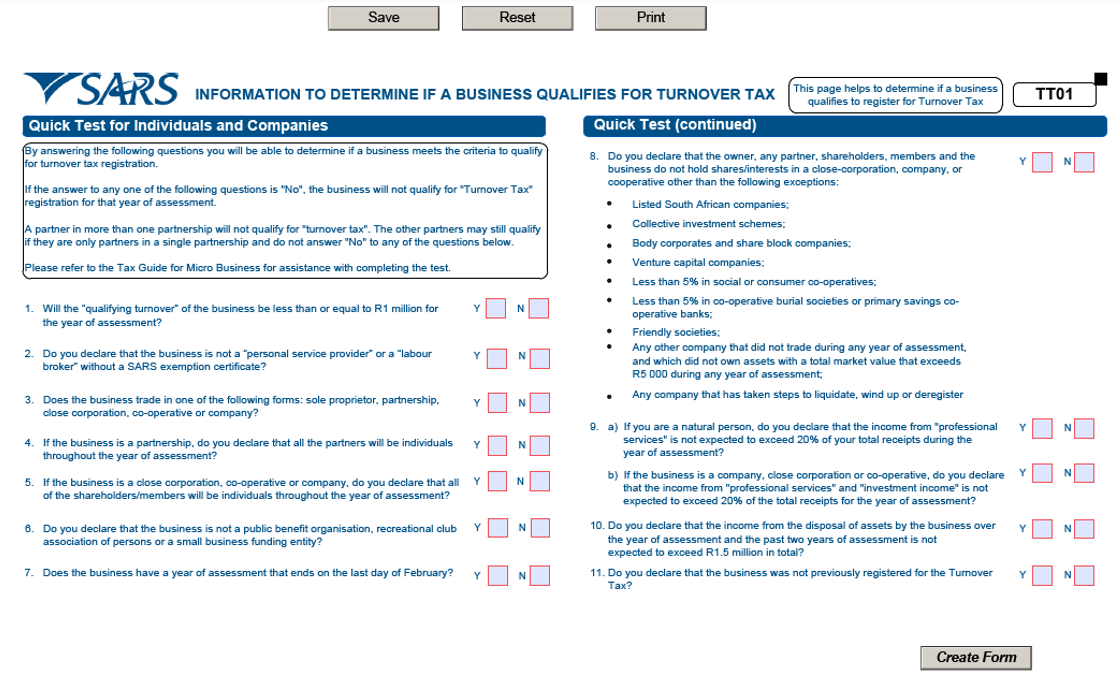
Note: A “No” response to any of the Quick Test questions indicates that the business does not meet the requirements for Turnover Tax.
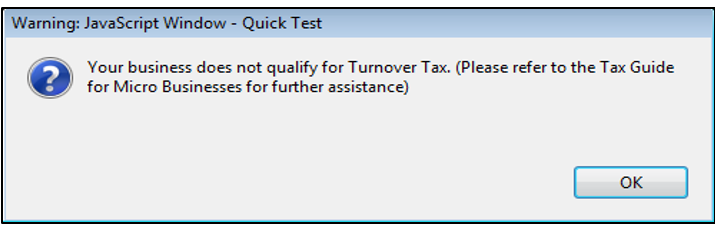
- If the Quick Test screen is incomplete or an answer is “NO,” the following message will appear:
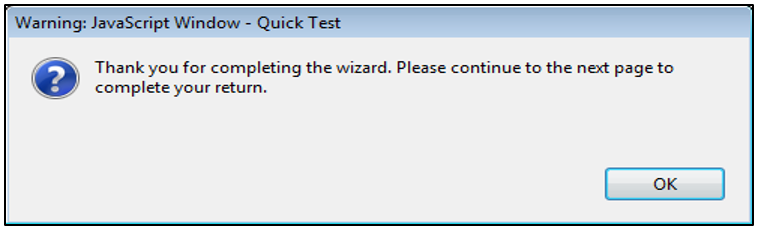
- Once the taxpayer has finished completing the Quick Test screen, select the “Create Form” button. A message will then appear on the screen.
- Select the relevant box to specify the status of the applicant:
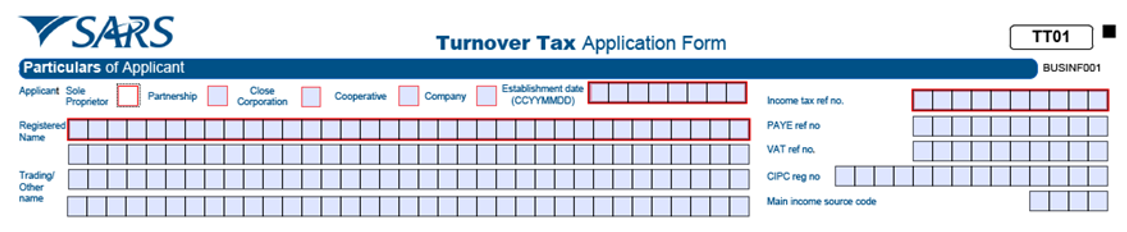
- Sole proprietor (individual);
- Partnership;
- Close corporation;
- Co-operative;
- Company.
Note: Un-ticked boxes will result in rejection of the application.
- Establishment date
- Indicate the date on which the business commenced operations, using the following – CCYYMMDD format. For instance, a company that commenced operations on 01 June 2002 should have this date recorded as 20020601 and this section is mandatory.
- Registered name
- This is the legal name under which the business is registered with the authority, such as the Companies and Intellectual Property Commission (CIPC) and this field is required if the box for close corporation, co-operative, or company at the top of the form is selected.
- Trading/other name
- This is the name the business uses or is known by to customers and this section is mandatory.
- Income Tax Reference Number
- This is the income tax registration number issued by SARS to a business. And this section is mandatory.
- PAYE Reference Number
- This is the Pay-As-You-Earn (PAYE) registration number issued by SARS to a business when it registers for PAYE.
- VAT Number
- This is the Value-Added Tax (VAT) registration number issued by SARS when it registers for VAT.
- CIPC Registration Number
- This is the Companies and Intellectual Property Commission (CIPC) registration number that a close corporation, co-operative or company obtains when it registers with CIPC and this field is required if the box for close corporation, co-operative, or company at the top of the form is selected.
- Main income source code
- This code refers to a particular sector within the economy, such as manufacturing, that represents the primary source of income for a business. The codes for the various sectors in the economy can be found in Annexure A and this section is mandatory.
Business Address
- This is the business’s physical address where trading occurs and this section is mandatory.
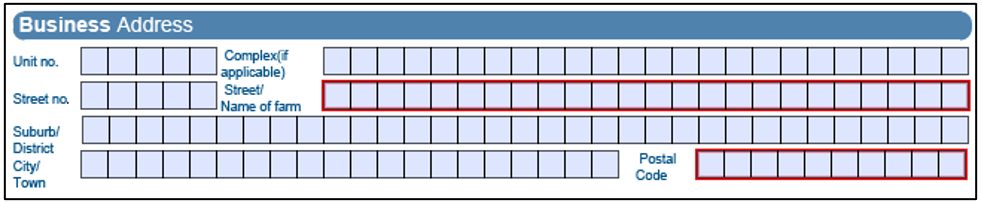
- When a business operates from a flat or townhouse, the specific unit number should be provided in the “unit no” section.
- Enter the name of the building or complex in the “complex” field.
- If the business does not operate from a flat, townhouse, or complex, leave these fields blank.
- Street Number;
- Street/Name of farm;
- Suburb/District;
- City/Town; and
- Postal code.
Postal Address
- This address refers to where the business prefers to receive its mail. It can be the same to the business address provided above or a different location, such as a post box number. If it is the same as the business address, mark the designated box with an “X” and this section is mandatory.

- If “No” selected, these fields will display and become editable:
- Postal Agency or Other Sub-unit (if applicable) (e.g. Postnet Suite ID)
- P.O.Box : Select the appropriate box to specify whether the postal address is a ‘P.O. Box’ or ‘Private Bag’.
- Private Bag :S elect the appropriate tick box to specify whether the postal address is ‘P.O. Box’ or ‘Private Bag’.
- Post Office.
- Postal Code.
- Registered Postal Address indicator.
- If “No” selected, these fields will display and become editable:
Bank Account Details
- These are the bank account details for the business and the fields must be completed after the selection of the Bank Name.

- Indicate if you do not have a local savings or chequing account.
- Account No.
- Branch No: If the ‘Bank Name’ has an assigned universal bank code, this field will be locked and automatically set to the universal branch code. Otherwise, the field will remain editable and must be completed accordingly.
- Branch Name: If the ‘Bank Name’ is a universal bank name, this field will be locked and set to “Universal branch.” If not, the field will be editable and must be completed.
- Account Type – Select Cheque or Savings/Transmission
- Account Holder Name (Account name as registered at bank) – Bank Name: Click the + sign to view and select a bank name, click the “OK” button to continue.
- Account Holder Name.
Note: To obtain accurate banking and universal codes, contact your bank branch for further information.
Particulars of Sole Proprietor/Applying Partner/Public Officer
Complete the following details:

- Sole proprietorship: sole proprietor or individual details
- Partnership: Information regarding the partner applying for Turnover Tax. If more than one partner is applying for Turnover Tax, a separate application form is required for each partner.
- Close Corporation: Information about the main member of the close corporation.
- Company: Information regarding the company’s public officer.
- Co-operative: Information about the partners who are applying to join the cooperative.
- The Income Tax Reference Number and date of appointment of the persons listed must also be supplied.
- First Name.
- Initials
- Surname
- Home Tel Number.
- Position Held.
- Bus Tel Number.
- ID Number.
- Date of Birth (CCYYMMDD).
- Income Tax Reference Number:
- Fax Number.
- Passport Number.
- Passport country (e.g. South Africa = ZAF).
- Date of Appointment (CCYYMMDD).
- Cell Number.
- Email Address.
Particulars of Three Partners/Members/Shareholders
- If there are multiple Partners, Members, or Shareholders, the total number should be specified.

Note: All fields in this section are required. Applicants may submit either their ID number or passport number; providing both is not necessary. Additionally, at least one contact phone number must be supplied.
Particulars of Partners/Members/Shareholders
- Complete the following fields for Partners/Members/Shareholders:
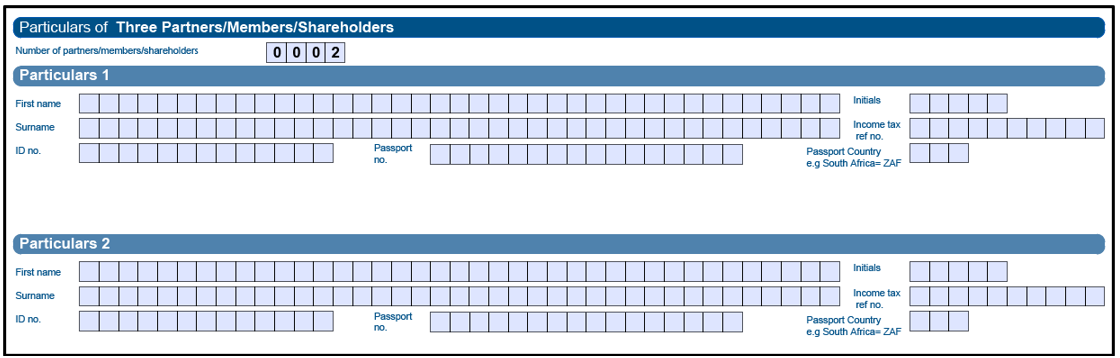
- First Name;
- Initials;
- Surname;
- Income Tax Reference Number;
- ID Number;
- Passport Number;
- Passport Country (e.g. South Africa = ZAF);
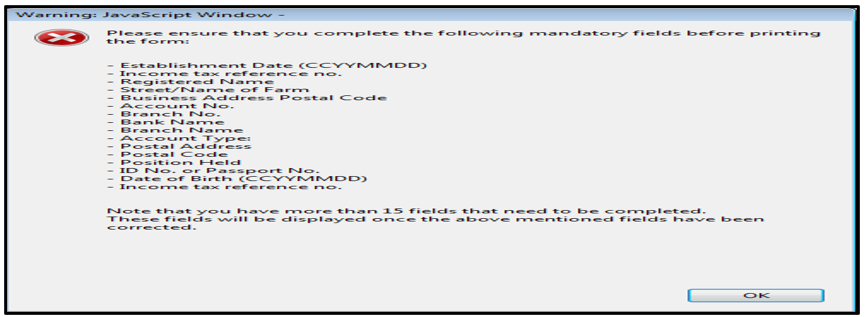
Note: If the taxpayer attempts to print the TT01 form without entering all required information, an error message will appear:
Other Buttons
- If the taxpayer is unsure about the form or needs to review certain details, they do not have to submit it immediately and can choose to wait.

- Click “Save” to retain captured information and finish the form later;
- Click “Reset” to restart the form.
- Click “Print” to print, sign, and submit the form to SARS.
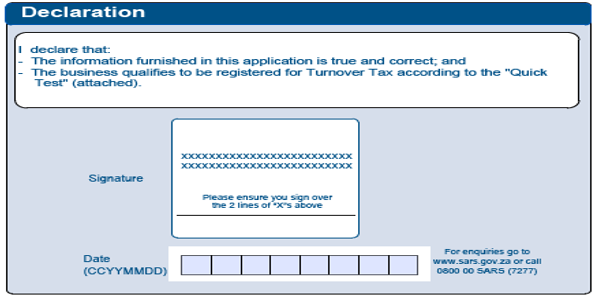
Declaration
- Once all information fields are completed, applicants must print, sign, and submit the declaration on the first page of the application form. Incomplete declarations will result in rejection of the application.
Application and Submission of Turnover Tax (TT01) Registration
Manual Registration for Turnover Tax (TT01)
- The TT01(a) – Application for Turnover Tax form (Manual Completion) is available for printing and completion at home and can be submitted to SARS and it is mandatory documents to be uploaded.
- The TT01 – Application for Turnover Tax form is accessible online and requires taxpayers to complete all mandatory fields prior to printing and submitting the document to SARS.
- The TT01 – can be submitted at your nearest SARS branch Office during a scheduled eBooking appointment, refer www.sars.gov.za. For further information.
- The TT01 can be submitted to SARS through the following email addresses:
- Tax Practitioners: [email protected]
- Taxpayers: [email protected]
SARS Online Query System (SOQS) Registration for Turnover Tax (TT01)
- The SARS Online Query System (SOQS) enables taxpayers to initiate a query or to submit Turnover Tax (TT01) registration online, enabling access to TT01 registration without the need to visit a branch.
- To access SARS Online Query System (SOQS), go to www.sars.gov.za and click the following screen:
- Once the link is clicked, it will give an option to choose from below:
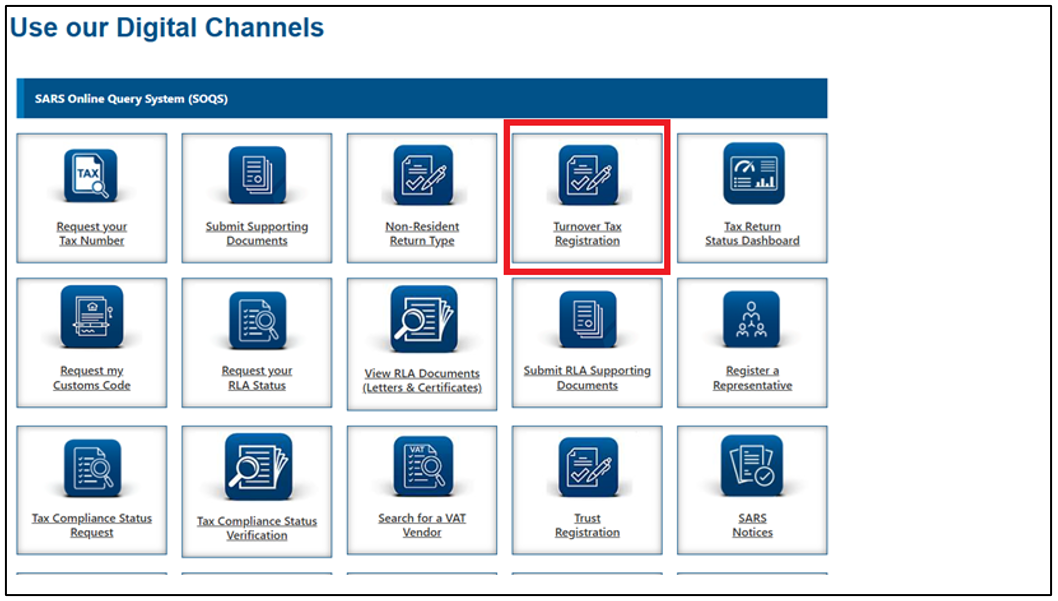
- Select “Turnover Tax Registration” Icon and the following screen will appear:
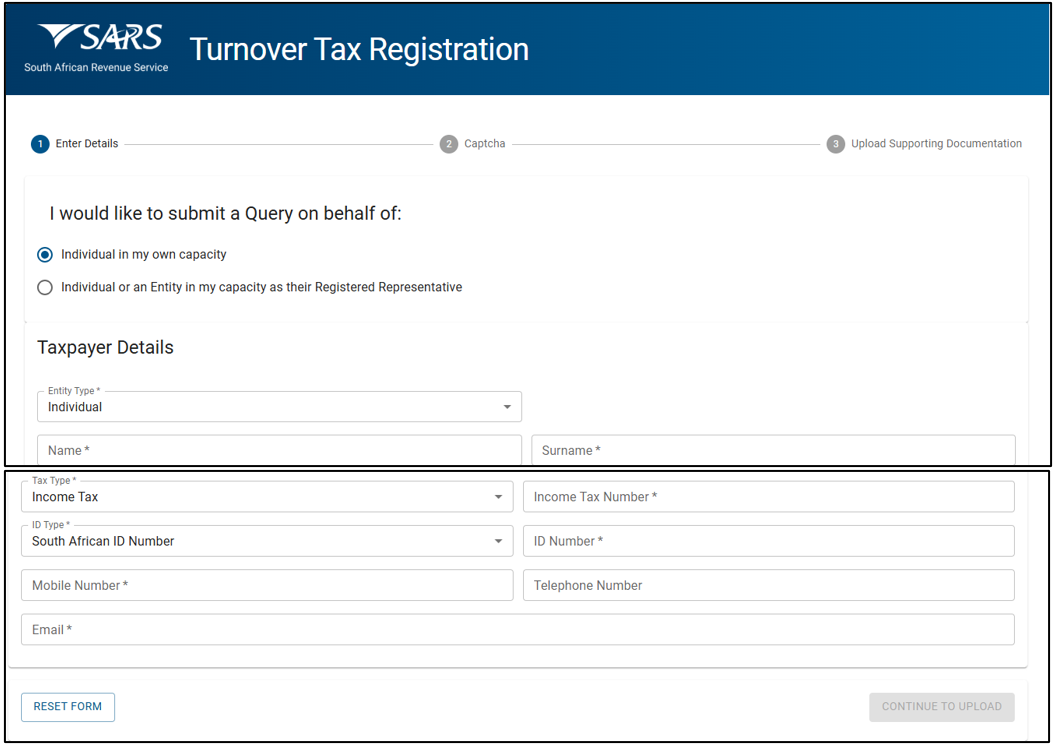
- The following details must be captured on the Turnover Tax Registration screen.
- Select the relevant radio button to specify the capacity of the applicant:
- The following details must be captured on the Turnover Tax Registration screen.
Note: The mandatory fields will have an asterisk (*) next to them. All the mandatory fields must be completed.
- If an “Individual in my own capacity” is selected, complete taxpayer details as follows:
- Entity Type – Selected as Individual or Company.
- Name
- Surname
- Tax Type – Enter the “Tax Reference Number” relating to the Tax Type selected:
- Income Tax Number.
- Identity Type – Select South African ID or Passport Number.
- If the taxpayer is an individual and a South African resident, only a valid ID number will be accepted.
- If the taxpayer is a foreign individual, a valid passport number must be used.
- Mobile Number.
- Telephone Number.
- If an “Individual in my own capacity” is selected, complete taxpayer details as follows:
- Entity Type – Selected as Company:
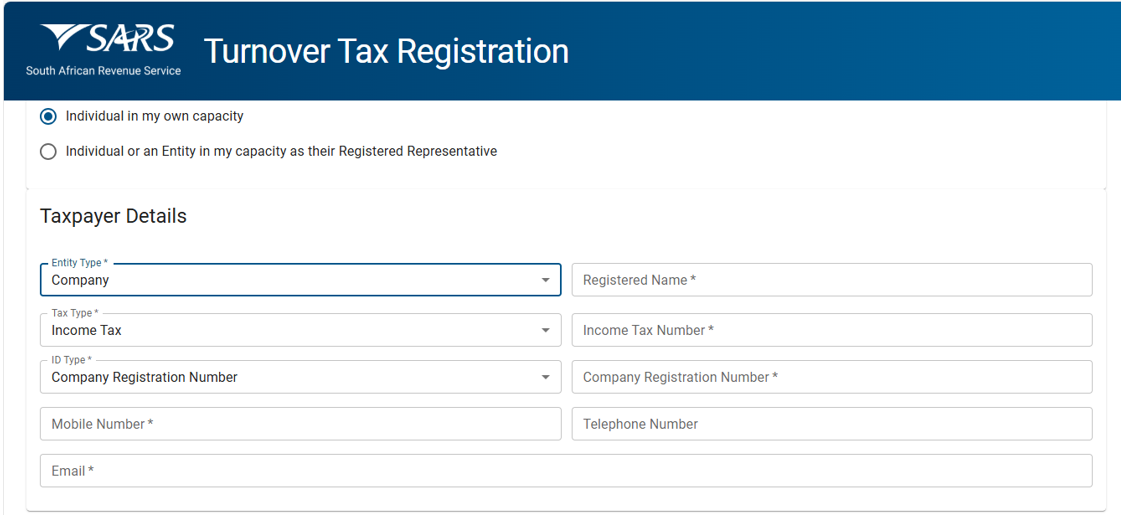
- Registered Name.
- Tax Type – Enter the “Tax Reference Number” relating to the Tax Type selected:
- Income Tax Number.
- Identity Type – If the taxpayer is a Company. Only a valid Company Registration number will be accepted.
- Mobile Number.
- Telephone Number.
- If an “Individual or an Entity in my capacity as their Registered Representative” is selected, complete Taxpayer Details as Company above, then complete the Registered Representative details as follows:
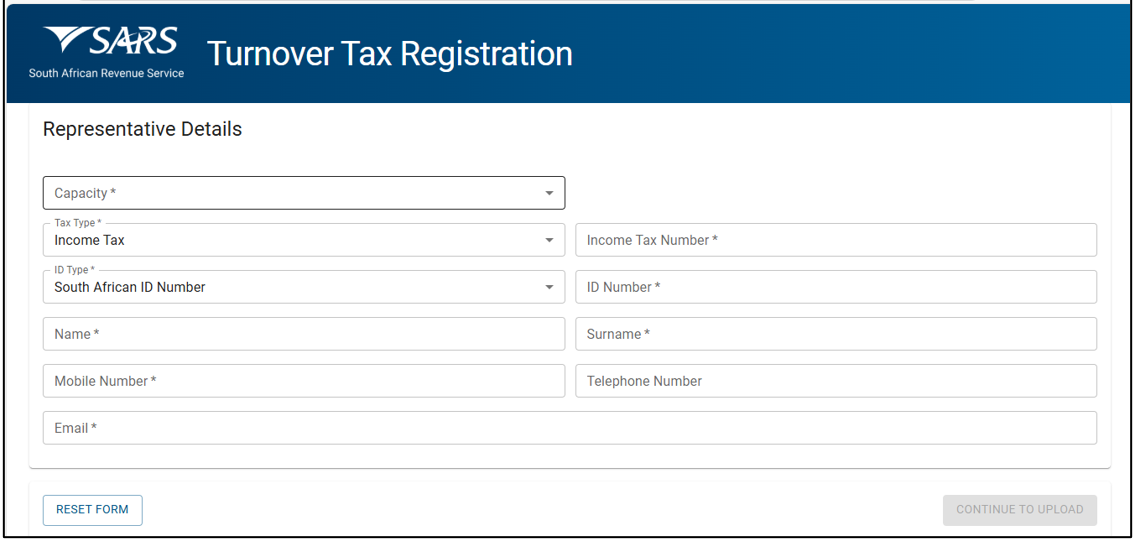
- Capacity – One of:
- Tax Practitioner.
- Main Trustee.
- Administrator (Estates).
- Executor
- Liquidator
- Curator
- Once-off Mandate.
- Public Officer.
- Employee with Mandate.
- Third Party with mandate.
- Accounting Officer.
- Tax Type – Income Tax Number.
- Identity Type – Select South African ID or Passport Number.
- If the taxpayer is an individual and a South African resident, only a valid ID number will be accepted.
- If the taxpayer is a foreign individual, a valid passport number must be used.
- Name
- Surname
- Mobile Number.
- Telephone Number.
- Email Address.
- Capacity – One of:
- Reset Form – Clicking on the reset form button will display a pop up message:
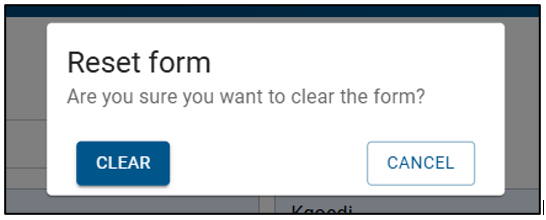
- ‘Are you sure you want to clear the form?’
- If the applicant clicks ‘cancel’ the system will close the pop-up message, upon clicking ‘clear’, the system will clear all captured values.
Note that the “Reset” button should only be used if all the information on the screen is incorrect or the capturer wants to restart the process of capturing.
- Click on “Continue to upload” – to be directed to the Captcha page.
- The “Captcha” screen will be displayed.
- If the taxpayer wishes to hear the capture in the case of using JAWS, there is a sound button to play the CAPTCHA field or a refresh button to create a new set of CAPTCHA alpha numeric.
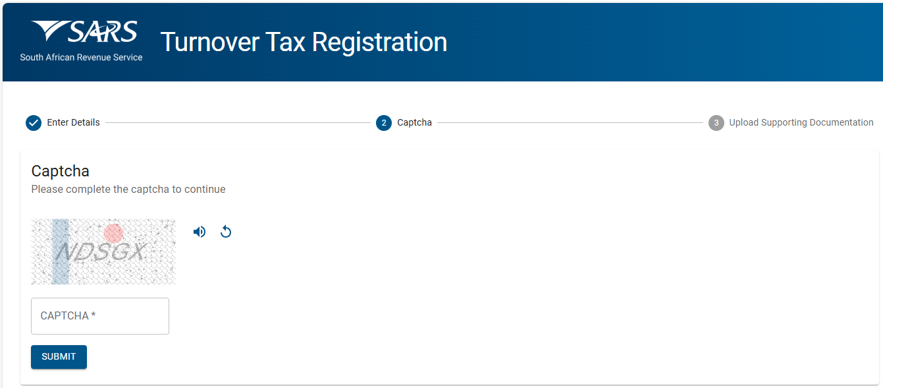
- Complete the on screen CAPTCHA field.
- Click on the “Submit” button to go to the Upload Supporting Documents screen.
- The Upload Supporting Documents screen will be displayed.
- These are the mandatory documents that will be requested for the registered Representative/Taxpayer/Applicant.
- Turnover Tax application form (TT01)
- Certified ID
- Proof of residential address
- Other documents (not Mandatory).
- These are the mandatory documents that will be requested for the registered Representative/Taxpayer/Applicant.
- These are the mandatory documents that will be requested for the Tax Practitioner.
- Turnover Tax application form (TT01)
- Certified ID
- Proof of residential address
- POA
- Letter
- Other documents (not mandatory)
- These are the mandatory documents that will be requested for the Tax Practitioner.
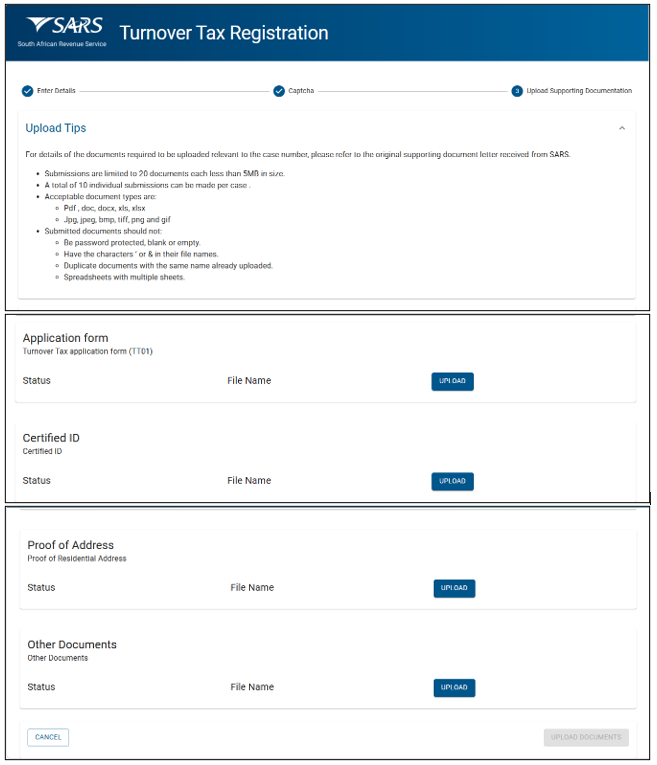
- There will be an upload button next to each supporting document required as per the screen above.
- Upload only the specific document and/or item indicated per upload section.
- If any of the mandatory documents is not uploaded, the submit button should be disabled until all mandatory documents are uploaded.
- If incorrect or duplicate documents are uploaded, an error message will appear.
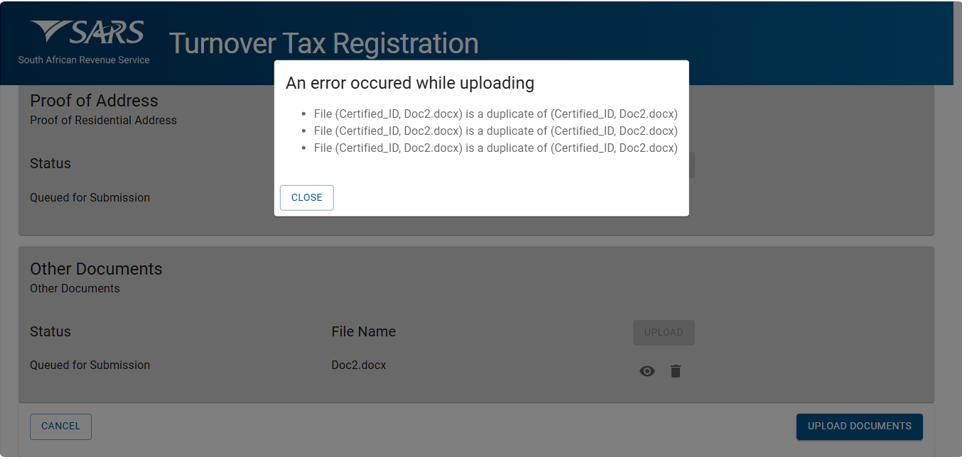
- Once all the supporting documents have been uploaded the system will enable the “UPLOAD DOCUMENTS” button.
- Click on “Upload Documents” button to submit the request. The following message will be displayed:
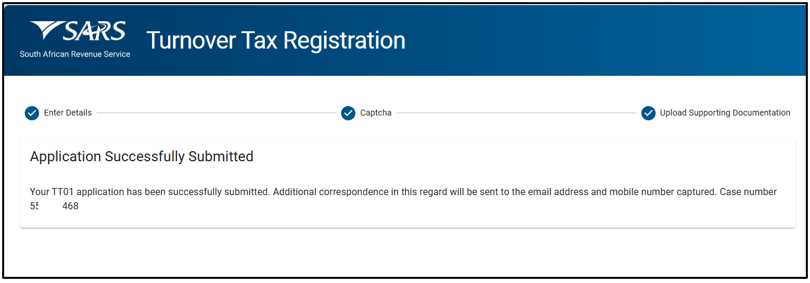
- The taxpayer will receive an SMS or email with the case number after submitting the Turnover Tax application.
Completion of the Annual Turnover Tax Returns (TT03)
How to Obtain and Submit a Turnover Tax Return
- The qualifying registered micro business can obtain the TT03 via the following SARS channels:
- The SARS website: www.sars.gov.za > Types of Tax > Turnover Tax
- Any SARS branch office, by scheduling an eBooking appointment for an agreed date and time to request for TT03 return.
- When the Turnover Tax Return (TT03) is correctly completed it can be submitted via the following channels:
- Any SARS branch office, by scheduling an eBooking appointment for an agreed date and time to request for TT03 return.
- The TT03 can be submitted to SARS via the following email addresses:
- Tax Practitioners: [email protected]
- Taxpayers: [email protected]
How to Complete the Turnover Tax Return (TT03)
- The TT03 will remain unpopulated with information, so all mandatory fields are required to be completed. Returns with incomplete mandatory fields will be rejected.
Taxpayer Information
- The following information must be completed on the TT03:

- Select the applicable taxpayer type. Indicate the appropriate box so that the correct form may be fully generated for completion:
- Individual – if an individual is operating as a sole proprietor or participating as a partner in a partnership.
- Company – If this is being completed on behalf of a close corporation, company, or co-operative.
- The Income Tax Reference Number.
- The year of assessment – This period runs from March 1 of the previous year to the end of February of the current year.
- Select the applicable taxpayer type. Indicate the appropriate box so that the correct form may be fully generated for completion:
Note: Select the “Personal details” container for individuals or the “Company/Close Corporation” container for companies, depending on the taxpayer type chosen.
- If “Individual” is selected as a taxpayer type, complete the following information:
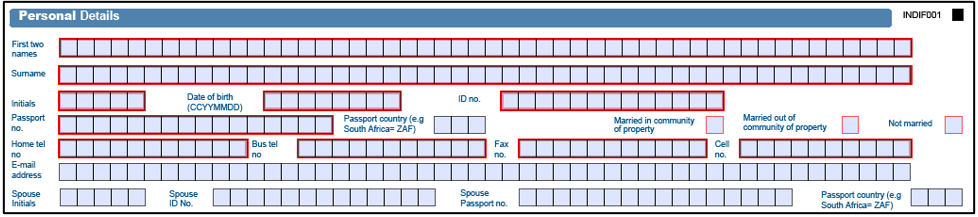
- The following fields are mandatory:
- First two names.
- Surname.
- Initials.
- Date of birth;
- Identity number: If the taxpayer is an individual and a South African resident, only a valid ID number will be accepted.
- Passport number: If the taxpayer is an individual and a foreigner, a valid passport number must be used.
- Passport Country: This field will be pre-populated with “ZAF”, representing South Africa. If this is not applicable, change to the relevant country. Refer to the list of country codes as per Annexure B.
- Marital status.
- Contact telephone numbers.
- Contact email.
- Spouse details: These fields are required to be completed in full if your marital status is indicated as “married in community of property.”
- If the marital status is recorded as “Married out of community of property / not married”, spouse details are not shown.
- The following fields are mandatory for Individuals:
- Year of Assessment.
- Turnover Tax Reference Number.
- Surname/Registered Name.
- First Names.
- Identity Number.
- initials.
- Cell Number.
- Passport Number.
- Date of Birth (CCYYMMDD).
- Home Telephone Number.
- Business Telephone Number.
- Fax Number.
- The following fields are mandatory:
Company/Close Corporation Details
- If “Company” is selected as the taxpayer, the following information must be provided:
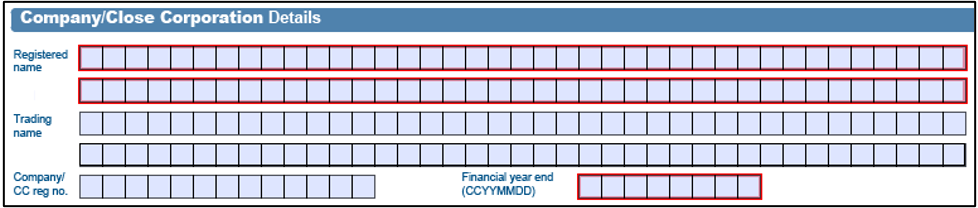
- Registered name: The name as indicated on your Companies and Intellectual Property Commission (CIPC) registration certificate.
- Trading Name.
- Company/Close Corporation registration number: the number as indicated on the Companies and Intellectual Property Commission (CIPC) registration certificate.
- Financial year end: this must be captured as year, month and day (CCYYMMDD).
- The following fields are mandatory for a Company:
- Year of Assessment.
- Turnover Tax Reference Number.
- Registered Name.
- Trading Name.
- Financial Year End (CCYYMMDD).
- Account Number.
- Branch Number.
- Account Type.
- Bank Name.
- Account Holder Name.
- Suburb/District.
- City/Town.
- Postal Code.
- Street/Name of Farm.
- Country Code.
Bank Account Details
- The Taxpayer must ensure that their bank account information is accurate, as any missing or incorrect details may result in delays in processing refunds.

- If a local bank account (cheque or savings/transmission) is not available, mark an “X” in the corresponding field.
- The fields for “No local Saving/Cheque Bank Account Declaration” and “Reason for no Local Savings/Cheque bank account” are required.
- Select the reason for missing bank account details.
- Mark “X” in the “Agreement Statement” box to confirm the non-local bank account information is accurate.
- If a local cheque or account savings/transmission is available, the relevant fields are required to be completed.
- If your banking details have changed from those previously provided, the individual or entity’s representative must present supporting documentation in person, The required documentation should be submitted at the nearest SARS branch office.
The following fields are mandatory:
- Account Number.
- Branch Number.
- If you cannot find the code on list, please enquire with your bank.
- Account Type.
- Account Holder Name.
- Bank Name.
- Branch Name.
- If the tick box and banking details are not completed, the return will be considered incomplete and sent back.
Note:
- SARS does not issue refunds to third-party accounts.
- For accurate banking and universal codes, check with your branch.
Banking detail changes
- From 1 July 2011, changing banking details requires verification. If you request changes on your TT03, you must visit a SARS branch in person during an eBooking appointment for verification.
- For more information about updating banking details:
- Visit your nearest SARS branch during an eBooking appointment, or
- Check the SARS website.
- For more information about updating banking details:
Physical Address
- This is the business’s physical address where trading occurs and this section is mandatory.
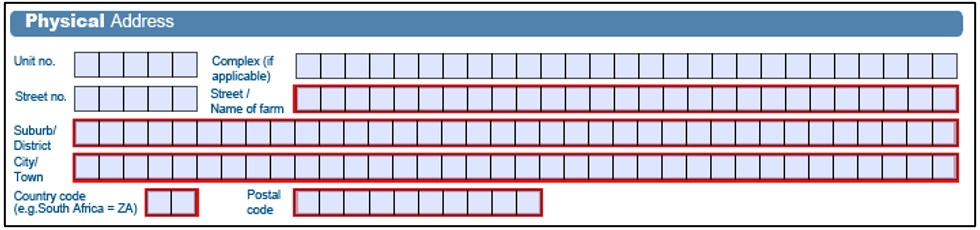
- When a business operates from a flat or townhouse, the specific unit number should be provided in the “unit no” section.
- Enter the name of the building or complex in the “complex” field.
- If the business does not operate from a flat, townhouse, or complex, leave these fields blank.
- Street Number.
- Street/Name of Farm.
- Suburb/District.
- City/Town; and
- Postal
Postal Address
- This address refers to where the business prefers to receive its mail. It can be the same to the business address provided above or a different location, such as a post box number. If it is the same as the business address, mark the designated box with an “X” and this section is mandatory.

- If the answer is “No”, the following fields will be displayed as open and editable:
- If “No” selected, these fields will display and become editable:
- Postal Agency or Other Sub-unit (if applicable) (e.g. Postnet Suite ID)
- P.O.Box : Select the appropriate box to specify whether the postal address is a ‘P.O. Box’ or ‘Private Bag’.
- Private Bag :S elect the appropriate tick box to specify whether the postal address is ‘P.O. Box’ or ‘Private Bag’.
- Post Office.
- Postal Code.
- Registered Postal Address indicator.
Tax Practitioner details
- If a tax practitioner completes the return, they must fill out this information.

Taxpayer’s signature and declaration
- The TT03 is a legal form submitted to SARS to declare a taxpayer’s total receipts for a given tax year.
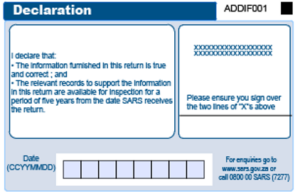
- The owner or legal representative must fully and accurately disclose all required information in the TT03. Providing false details, failing to submit a return, or misrepresenting facts may result in interest, penalties, or prosecution.
- Once the return is completed, the owner or legal representative should review the declaration and provide their signature as required.
- If a return is submitted to SARS without a signature, it will be returned and considered outstanding. Penalties may apply for late submission of the return.
Voluntary Disclosure Programme (VDP)
- Where an approved VDP agreement exists between yourself and SARS, make sure that you have:
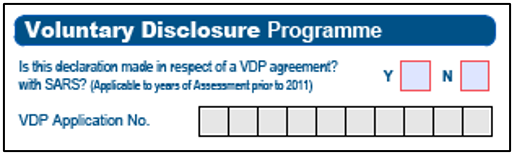
- Inserted an “X” in the “Y” box.
- Completed the VDP application number.
- Should you require more information, a Comprehensive Guide concerning VDP is available on the SARS website www.sars.gov.za
Public Officers particulars
Complete this section if “Company” has been selected as the taxpayer type. The following fields are required:

- Surname
- Cell Number.
- Date of Appointment.
- Identity Document Number.
- Other Telephone Number.
- Passport Number.
- Passport Country.
- Email address.
Turnover Tax Calculation
- This section provides step-by-step instructions to help taxpayers calculate their taxable turnover, which is used to determine their final tax liability for the assessment year.
- The following information must be captured in the TT03:

- Individual – if you operate as a sole proprietor or participate as a partner in a partnership.
- Select the applicable taxpayer type. Ensure the corresponding box is checked so that the correct form can be generated for completion.

- Company – if completing for a close corporation, company or co-operative
- Individuals
- Select the relevant type of business:
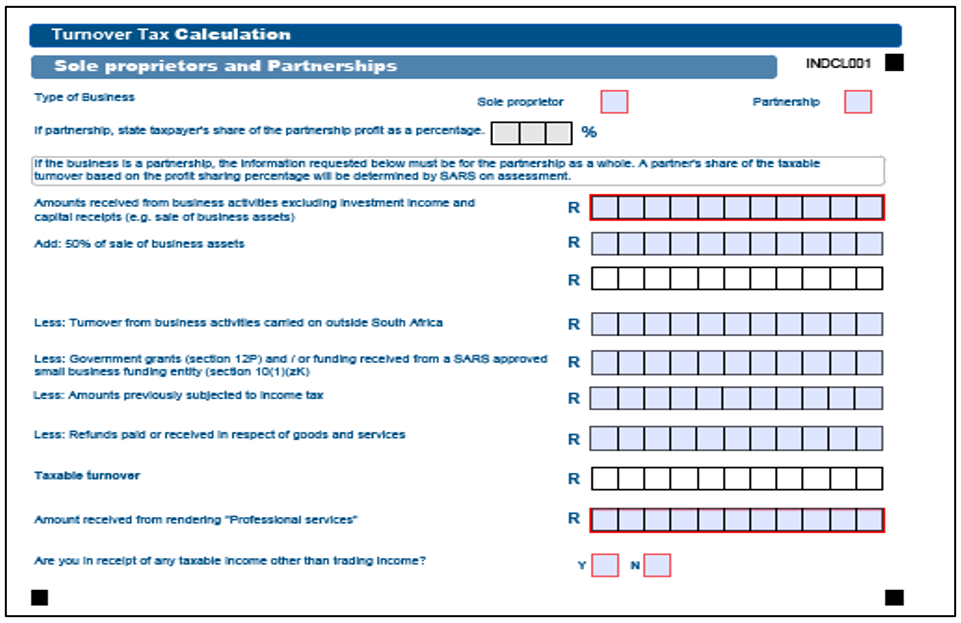
- Sole proprietor, if you are an individual running your own business.
- Partnership, if you are an individual in a partnership.
- If the entity is a partnership, please indicate the taxpayer’s ownership percentage in the partnership.
- Sole proprietor.
- Determine the total amounts received from business activities excluding investment income and capital receipts (e.g., sale of assets used mainly for business purposes).
Note:
- Investment income is any income in the form of annuities, dividends, foreign dividends, interest, rental derived in respect of immovable property, royalties, or income of a similar nature and any proceeds derived from the disposal of financial instruments.
- This income will be taxed in the hands of the individual/sole proprietor as per the normal income tax rules and an Income Tax Return (ITR12) is required to be submitted to declare the investment income separately (and any other non-micro business income such as salary). This will allow the individual/sole proprietor to access the income tax exemptions for interest and dividends.
- Determine “Inclusions” to be declared on the TT03 as follows:
- 50% of receipts of a capital nature.
- Determine the total of the sales of business assets that were mainly used for business purposes for the year of assessment. For this purpose, trading stock consisting of immovable property should be excluded as well as financial instruments. Where the business asset is immovable property, only include that portion of the sale that can be attributed to the part of the property that was used for business purposes. Calculate 50% of the total of the sale of business assets and add it to the gross receipts.
- 50% of receipts of a capital nature.
- Determine “Exclusions” to be declared on the TT03 as follows:
- Turnover from business activities carried on outside South Africa
- Determine the total of the sales from business activities outside South Africa for the year of assessment and deduct this from the gross receipts.
- Government grants (section 12P) and/or funding received from a SARS approved small business funding entity (section 10(1)(zK)
- Determine the total of Government grants as contemplated in section 12P and/or funding received from a SARS approved small business funding entity (section 10(1)(zK) received for the year of assessment and deduct this from the gross receipts. These grants are specifically exempted from Income Tax.
- Amounts previously subjected to Income Tax
- Amounts that were previously subjected to Income Tax should not be taxed again and should therefore be deducted from the gross receipts.
- Refunds paid or received in respect of goods and services
- Credit notes: For example, damaged goods returned.
- Taxable Turnover
- The Turnover Tax liability of the business for the year of assessment will be determined by SARS by applying the appropriate tax rate as per the annual Turnover Tax rates.
- Amount received from rendering Professional Services
- In the case of natural persons, if more than 20% of total receipts are received due to the rendering of a professional service, you will not qualify for the Turnover Tax regime and you will be taxed under the normal Income Tax system.
- Turnover from business activities carried on outside South Africa
- Indicate whether you are in receipt of any income other than trading income:
- An ITR12 is required to be submitted with the TT03 if “Y” is selected. Additional information on requesting and submitting an Income Tax Return (ITR12) is available on the SARS website: www.sars.gov.za.
- Indicate whether you are in receipt of any income other than trading income:
- Example: A sole proprietor, who received the following amounts for the year of assessment:
| Sales | R 359 600 |
| Sales of business assets – sewing machine | R 4 000 |
| Interest from the business bank account | R 1 000 |
| Turnover from business activities carried outside SA | R 5 400 |
- Taxable turnover for the year of assessment will be determined as follows:
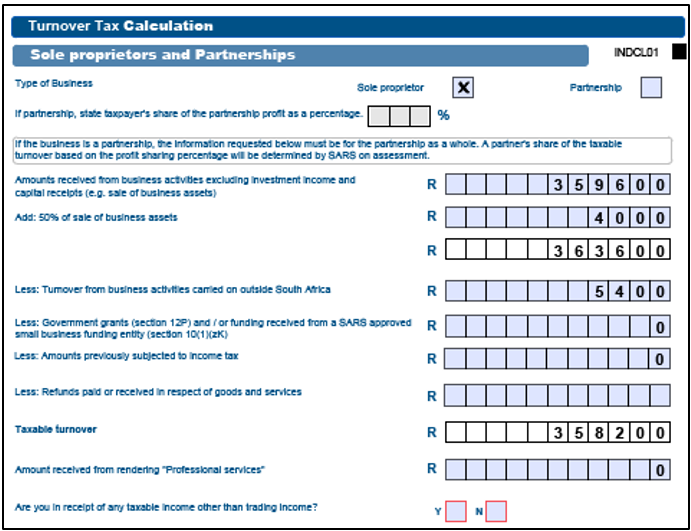
- The taxable turnover of R358 200 will be assessed by SARS. According to the 2019 Turnover Tax rates, the Turnover Tax payable on R358 200 is R232 (R358 200 less R335 000 x 1%). Assuming that the taxpayer made interim payments of R116 in August and R116 in February, the assessment will show that the amount owing, after taking the interim payments into account, is nil (R232 less R116 less R116).
- An ITR12 must be submitted to declare the R1,000 interest, which is exempt from tax as it falls below the threshold. Any other income, such as salary, should also be declared on the ITR12, which must be submitted with the TT03. For instructions on requesting and submitting an ITR12, visit the SARS website: www.sars.gov.za.
Partnerships
- The process is the same for sole proprietors except that the final taxable turnover of the business will be apportioned and taxed in the hands of each partner based on the profit-sharing ratio as per the partnership agreement. The total turnover of the business must therefore be declared (it is important to note that the qualifying turnover of the partnership may not exceed R1 million for the tax year in question).
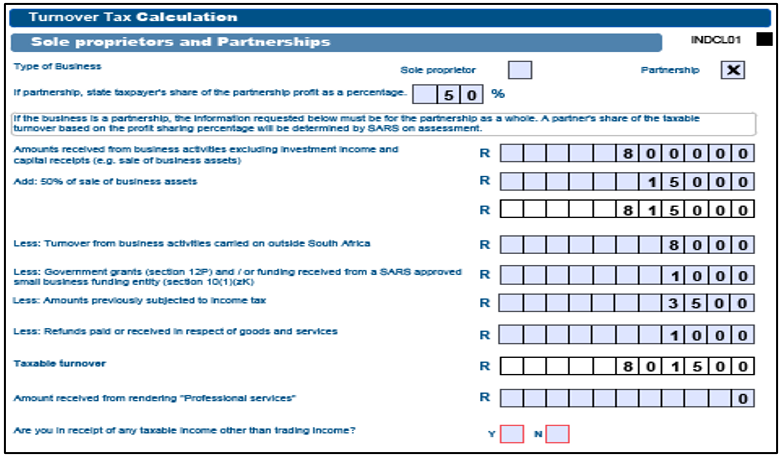
- Example: Two brothers are partners in an electronic equipment repair business. They share the profits of the business equally, do not have any other business interests, and were never registered for Income Tax previously. Their business received the following amounts for the year of assessment:
| Amounts from repairs | R 800 000 |
| Sales of business assets – repair equipment | R 30 000 |
| Interest from the business bank account | R 2 000 |
| Rental from a portion of their property | R 6 000 |
| Amount received due to business activities in Australia | R 8 000 |
Grant received from government (section 12P) and/or funding | R 1 000 |
received from a SARS approved small business | |
| funding entity (section 10(1) (zK) | |
| Amounts received but taxed in previous years | R 3 500 |
| Credit note | R 1 000 |
- Their taxable turnover for the year of assessment will be determined as follows:
- Since this is a partnership, the taxable turnover will be taxed in the hands of each partner based on the profit-sharing percentage the partners share profits equally, each partner will be taxed as follows
- The taxable turnover of business X profit sharing % (R801 500 x 50%) R400 750. The tax of each partner on taxable turnover as per the 2019 Turnover Tax rates is R657.50 (R400 750 less R335 000 x1%). Assuming that each partner made interim payments of R328.75 in August and R328.75 in February, his/her assessment will show that the amount owing, after taking the interim payments into account, is nil (R657.50 less R328.75 less R328.75).
- Their taxable turnover for the year of assessment will be determined as follows:
Note: The interest of R1 000 (R2 000 x 50%) will be taxed in the hands of each partner according to the normal Income Tax rules but will be exempt from tax since it is below the interest exemption threshold. The rental income of R3 000 (R6 000 x 50%) will also be taxable in the hands of each partner. Any other income for each partner where relevant, for example, salary is also to be declared in each partner’s ITR12.
- Specify if you have received any income aside from trading income.
- An ITR12 is required to be submitted with the TT03 if “Y” was selected. More information about requesting and submitting an ITR12 can be found on the SARS website: www.sars.gov.za.
Close Corporations, Companies and Cooperatives
- Select the relevant type of business:
- Company
- Close Corporation
- Co-operative.
- Determine “Total amounts received from business activities excluding investment income and capital receipts (e.g. sale of business assets)”.
- This is the total of amounts received from business activities in South Africa. This amount will be referred to as gross receipts for the determination of the taxable turnover.
- Investment income is generally annuities, dividends, foreign dividends, interest, rental derived in respect of immovable property, royalties, or income of a similar nature and any proceeds derived from the disposal of financial instruments.
- Adjust the gross receipts by adding:
- “50% of sales of business assets”
- Determine the total of the sales of business assets for the year of assessment. Where the business asset is immovable property, only include that portion of the sale that can be attributed to the part of the property that was used for business purposes. Calculate 50% of the total of the sale of business assets and add it to the gross receipts.
- “Investment income (except local and foreign dividends)”
- Investment income like annuities, dividends, foreign dividends, interest, rental derived in respect of immovable property, royalties, or income of a similar nature and any proceeds derived from the disposal of financial instruments received by the business must be added to gross receipts.
- Adjust the gross receipts by deducting the following:
- Turnover from business activities carried on outside South Africa
- Determine the total of the sales from business activities outside South Africa for the year of assessment and deduct this from the gross receipts.
- Government grants (section 12P) and/or funding received from a SARS approved small business funding entity (section 10(1)(zK)
- Determine the total of Government grants received for the year of assessment and deduct this from the gross receipts. These grants are specifically exempted from Income Tax.
- Amounts previously subjected to Income Tax
- Amounts that were previously subjected to income tax should not be taxed again and should therefore be deducted from the gross receipts.
- Refunds paid or received in respect of goods and services
- Credit notes: for example, damaged goods.
- Taxable turnover
- The taxable turnover will be used to assess the Turnover Tax liability of the business for year of assessment.
- The only difference from individuals and partnerships is that investment income (interest, rentals, annuities and royalties), with the only exception of Local and Foreign dividends, will be included in full in the taxable turnover of the Company/Close Corporation/Co-operative.
- The process for determining the taxable turnover for Close Corporations, Companies and Cooperatives is summarised in the following table:
- The total “Amount received from professional services” rendered during the year of assessment must be stated on the return.
- If more than 20% of total receipts are received due to investment income and the rendering of a professional service, the company will not qualify for the Turnover Tax regime and must be taxed under the normal income tax system.
- Indicate the amount of “Dividends declared for the year of assessment” by the company.
- Investment income excluding dividends is included in taxable turnover.
- The first R200 000 is exempt from dividends withholding tax, however, any amount in excess of R200 000 will be subject to the dividends withholding tax.
- Investment income excluding dividends is included in taxable turnover.
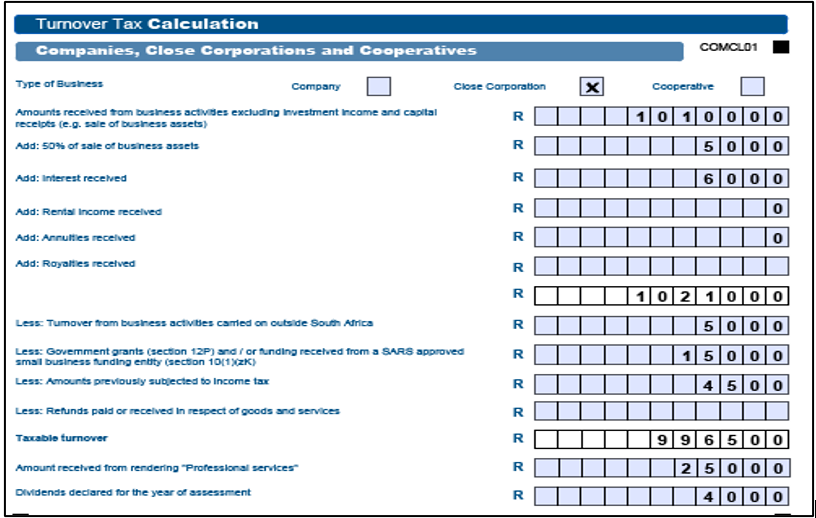
- Example: Micro CC is a close corporation with five members. Its main business concerns the sale and distribution of computer hardware and software in South Africa and to neighbouring countries. On small scale, it also offers its clients a computer repair service. After being on the income tax register for a while, Micro CC decided to register for Turnover Tax. The business received the following amounts for the year of assessment:
| Amounts from sales in South Africa | R885 000 |
| Amounts from sales outside South Africa | R100 000 |
| Amounts from services and repairs | R 25 000 |
Government grant that is exempt from income tax | R 5 000 |
| (Section 12P) and/or funding received from a SARS approved small business funding entity (section 10(1) (zK) | |
| Sales of business assets – packaging machine | R 10 000 |
| Dividends from investments in another company | R 4 000 |
| Interest from the business bank account | R 6 000 |
| Credit note | R 4 500 |
| Amounts previously subjected to income tax | R 15 000 |
Note:
- The credit note relates to a refund received by Micro CC for faulty equipment that was returned to the supplier.
- The sales figure includes an amount of R15 000 received from a client in South Africa for a contract concluded in the previous year of assessment. The R15 000 had accrued to Micro CC in the previous year of assessment and was already subject to normal Income Tax.
- The amount for services and repairs constitutes professional services.
- Determine taxable turnover:
| Sales in SA | R885 000 |
| Add: Sales outside SA | R100 000 |
| Professional Services | R 25 000 |
| Total amounts received | R1 010000 |
- The taxable turnover of R996 500 will be assessed by SARS. According to the 2019 Turnover Tax rates, the Turnover Tax payable on R996 500 is R14 045 (R6 650 + 3% of an amount exceeding R750 000, namely R996 500 = R7 395). Assuming that the taxpayer made interim payments of R10 000 in August and R3 045 in February, the assessment will show that the amount owing, after taking the interim payments into account, is R1 000 (R14 045 less R10 000 less R3 045).
- As the total “Amount received from professional services” rendered during the year of assessment is less than 20% of total receipts the company will qualify for the Turnover Tax regime.
- As the first R200 000 is exempt from dividends withholding tax, the R4000 will not be subject to the Dividends Withholding Tax.
Assessment of Taxable Turnover
- SARS will assess the taxable turnover of each business, based on the above determination, to calculate the Turnover Tax liability of the business. The Turnover Tax liability of the business for the year of assessment will be calculated by applying the appropriate Turnover Tax rate (available on the SARS website) to the taxable turnover.
- Ideally, the interim payments that were made by the business by the last business day of August and February of the year of assessment should be sufficient to discharge this liability in full. However, if there is an excess or a shortfall, this will be refunded or recovered by SARS on assessment.
- Completion notes:
- This paragraph must describe the reason for writing the guide.
- State the applicability of the guide
- This portion must also be used to state any specific exclusion.
- Keep the purpose section brief.
- Example:
- This document provides information for employers about their responsibilities regarding Unemployment Insurance Fund contributions.
- This guide outlines the legislative obligations that employers must follow regarding the deduction and payment of Unemployment Insurance Fund contribution and assist users in gaining.
Completion of the Payment Advice for Turnover Tax (TT02)
How to Request, Complete and Make Payment
- The qualified registered micro business can obtain a Payment Advice for Turnover Tax (TT02)via the following SARS channels:
- By visiting a SARS branch.
- On the SARS website: www.sars.gov.za > Tax Types > Turnover Tax.
- A bank – When payment is made, it is essential that the ‘Beneficiary ID’ and ‘Payment Reference Number’ (PRN) be quoted. The TT02 will assist with this and other matters relating to interim payments. Refer below on how the ‘Payment Reference Number’ is structured.
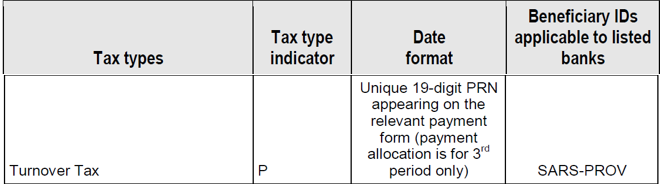
Note. The TT02 Payment advice is intended solely for the taxpayer’s records and is not required to be submitted to SARS.
- When a micro business registers for Turnover Tax, the taxpayer must make both a first and a second interim payment during the year of assessment. These interim payments are applied toward the final Turnover Tax liability, as determined by the annual Turnover Tax return for that assessment period.
- Due to the Corona Virus Infection Disease (COVID-19) outbreak, Government has put measures in place aimed at assisting to alleviate cash flow problems.
- The “qualifying micro business” is a micro business as defined in the Sixth Schedule to the Income Tax Act that –
- is a taxpayer as defined in section 151 of the Tax Administration Act; and
- is tax compliant as referred to in section 256(3) of the Tax Administration Act when relying on a deferral under this Act; and under the national lockdown defined below:
- “National Lockdown” is the national lockdown under the regulations published by Government Notice No. 318 of 18 March 2020 under the Disaster Management Act, 2002 (Act No. 57 of 2002), starting on 26 March and ending on a date determined by the Cabinet member designated under section 3 of that Act.
- The qualifying micro business may –
- during the period commencing on 1 April 2020 and ending on 30 September 2020, in respect of interim payments payable in terms of paragraph 11(1) of the Sixth Schedule to the Income Tax Act, pay 15 per cent instead of 50 per cent of the amount of tax so calculated in terms of that paragraph; and
- during the period commencing on 1 April 2020 and ending on 31 March 2021, in respect of interim payments payable in terms of paragraph 11(4) of the Sixth Schedule, pay 50 per cent instead of an amount equal to the amount of tax calculated in terms of that paragraph less the amount paid in terms of paragraph 11(1) of the Sixth Schedule.
- The Interim payments deferred in terms of the above information will be due and payable by the micro business by the date of payment as specified in a notice of assessment.
- No penalties in terms of paragraph 11(6) of the Sixth Schedule will be levied on amounts deferred in terms of the above information.
- No interest in terms of paragraph 11(3) and (5) of the Sixth Schedule will be charged in respect of interim payments deferred in terms of the above information.
- The above-mentioned proposals will not apply to a micro business that –
- has failed to submit any return as defined in section 1 of the TAA as required by section 25 of the TAA; or
- has any outstanding tax debt as defined in section 1 of the TAA, but excluding a tax debt –
- in respect of which an agreement has been entered into in accordance with section 167 or 204 of the TAA.
- that has been suspended in terms of section 164 of the TAA; or
- that does not exceed the amount referred to in section 169(4) of the TAA.
- However, penalties and interest will apply in instances where, upon assessment, it is discovered that a micro business does not qualify for relief under Disaster Management Act, 2002 (Act No. 57 of 2002). The usual procedures for requests for remittance of such penalties will be available in such cases.
- For purposes of the calculation of the 65/35 per cent payment spread instead of the normal 50/50 per cent, see explanation below on how to calculate it:
- Company B has a 28 February 2021 FYE; meaning that its interim provisional tax payment will fall during the temporary period. Company B’s estimated taxable turnover for the year of assessment is R800 000. As such, the first interim payment (due by 31 August 2020) will be R120 000 (15 per cent of its estimated total tax liability of R800 000 for the year) instead of R400 000, allowing temporary relief of R280 000. As a further relief measure only 50 per cent of the estimated tax liability (R400 000) will be due by 28 February 2021, so that the cumulative total tax paid at that point is 65 per cent of the estimated total tax liability. The remaining balance of R280 000(35 per cent of estimated tax liability) will be due on assessment in order to avoid interest charges.
Note: Micro business does not have the third topping up option as that is available to provisional taxpayers therefore, they must pay the different amount once the notice of assessment is issued.
Registration Particulars
Complete following fields and this Section is :

- Registered Name.
- Turnover Tax Reference Number.
- Turnover Tax period.
Turnover Tax Calculation
Complete the following fields and this Section is mandatory:

- Estimated taxable turnover for the full year of assessment.
- Tax on the estimated taxable turnover (apply the applicable Turnover Tax Rates – Annexure D).
- Tax payable for this period (refer to Turnover Tax liability refer to Annexure D).
Payment Notes
- These are rules when making payments to SARS; adherence is required to allocate the payment to the correct account.

- Complete following fields:
- Name
- Reference Number.
- Name of banking institutions.
- Bank Account Name.
- Payment Reference Number.
- Amount payable.
Permissible Shares and Interest
- The disqualification in terms of paragraph 3(a) or 3(F)(iii) does not apply to a share or interest –
- In a company of the definition of” listed company”.
- In a portfolio in a collective investment scheme.
- In a company body corporate and share block companies.
- In a venture capital companies in section.
- That constitutes less than 5% of the interest in a social or consumer or co-operatives or co-operative burial.
- That constitutes less than 5% of the interest in a or primary savings co-operative banks or primary savings and loans co-operative banks.
- In any friendly societies
Deregistration
- Registered micro businesses may request voluntary deregistration from SARS, or SARS may begin the process of compulsory deregistration.
- A taxpayer can send a written request via email mentioned in Section particulars of the Applicant; or
- A letter can be sent by SARS to the taxpayer informing him/her of deregistration from turnover tax.
- A voluntary deregistration from turnover tax:
- A registered micro business may choose to deregister prior to the commencement of an assessment year, or at a subsequent date within the assessment year as stipulated by the Commissioner in a Gazette notice. Upon election to deregister, the status will be effective from the start of that particular assessment year.
Note: A registered micro business that has exited the turnover tax system will not be permitted to re-enter it.
Compulsory Deregistration of a Registered Micro Business from Turnover Tax
- A micro business must deregister from Turnover Tax if its qualifying turnover for the year exceeds R1 million and it is unable to demonstrate that this increase is minor and temporary. In such cases, the business is required to inform SARS within 21 working days from the date it ceases to qualify as a registered micro business. If:
- More than 20% percent of that person’s total receipts during that year of assessment consist of –
- Where that person is a natural person (or the deceased or insolvent estate of a natural person that was registered micro business at the time of death or insolvency), income from the rendering of professional service; and
- Where that a person is a company, investment income and income from rendering of professional service.
- More than 20% percent of that person’s total receipts during that year of assessment consist of –
- At any time during that year of assessment that person is a ‘personal services provider or a labour broker’ without a SARS exemption certificate.
- The total of all amounts received by person from the disposal of –
- Immovable property is used mainly for business purposes.
- Any other asset of a capital nature is used mainly for business purposes, other than any financial instrument.
- Exceeds R1.5 million over a period of three years comprising the current years of assessment and the immediately preceding two years of assessment, or such shorter period during which that person was registered micro business.
- In the case of a Company –
- Its year of assessment ends on a date other than the last day of February.
- At any time during its year of assessment, any holder of shares in that micro business is a person other than a natural person (or the deceased or insolvent estate of a natural person).
- At any time during its year of assessment, any holder of shares in that micro business holds any shares or has any interest in the equity of any other company other than a share or interest described in Application and Submission of Turnover Tax (TT01) Registration.
- The rules relating to holding of shares do not apply to the holding of any shares in or interest in the equity of a company under the following conditions:
- If the company— has not during any year of assessment –
- Carried on any trade; and
- Owned assets, the total market value of which exceeds R5 000; or
- Has taken the steps contemplated in section 41(4) to liquidate, wind up or deregister: however, that this paragraph ceases to apply if the company has at any stage withdrawn any step so taken or does anything to invalidate any step so taken, with the result that the company will not be liquidated, wound up or deregistered.
- It is a public benefit organisation approved by the Commissioner in terms of section 30.
- It is a recreational club approved by the Commissioner in terms of section 30A.
- It is an association approved by the Commissioner in terms of section 30B; or
- It is a small business funding entity approved by the Commissioner in terms of section 30C.
- In the case of a person that is a Partner in a Partnership during that year of assessment –
- Any of the person in that partnership in not a natural person.
- That person is a partner in more than one partnership at any time during that year of assessment.
- The qualifying turnover of that partnership for that year of assessment exceed the amount of R1 million.
- A business that no longer qualifies to be registered for Turnover Tax will be deregistered from the first day of the month following the month in which it no longer qualifies.
- A registered micro business will also be deregistered from Turnover Tax if it closes down. The business will be deregistered from the day following the day on which it ceased to exist, and care must be taken to ensure that income from winding up, such as the disposal of assets, is accounted for in taxable turnover.
- If a business closed down or in the case of a deceased estate, the normal deregistration process must be followed as for sequestrated/liquidated companies and deceased estates.
- In the case of a Company –
Note 1: If the increase in the qualifying turnover of that person to an amount greater than R1 million is of a nominal and temporary nature (for example a once off tender contract), it is the taxpayer’s responsibility to inform SARS within 21 business days after becoming aware of the fact that the R1 million qualifying turnover is going to be exceeded, in a form of a letter of request together with any supporting document(s) to motivate that their registered micro business still qualifies for Turnover Tax even though it will exceed R1 million for that year of assessment.the person must apply to the Commissioner for a decision whether the person must remain a registered micro business or not.
- In the event whereby a Turnover Tax Return (TT03) with a temporary nature resulting in a turnover greater than R1 million are submitted, the TT03 submission must be accompanied by the indicated motivation to avoid deregistration.
Note 2: Registered micro businesses are allowed to be registered for Turnover Tax as well as VAT as from 1 March 2012. Also, note that as from 1 March 2014, a registered micro business may elect to only submit VAT and/or PAYE returns on a six-monthly basis, at the end of August and February of each tax year.
Transitional Provisions for Deregistration Micro Business
- If registered Turnover Tax businesses exceed the qualifying thresholds during a specific assessment year, they are required to deregister from Turnover Tax and transition to the standard income tax system.
- Section 48C amendment enables the deregistration of Micro businesses to migrate smoothly and exempting the micro businesses from being penalised for underpayment to which the micro business would otherwise have become liable for, solely as a result of being deregistered due to its qualifying turnover tax exceeding R1 Million. This is effective from 01 March 2018.
Record Keeping
A registered micro business is required to maintain documentation of the following records for audit purposes:
- Amounts received during a year of assessment.
- Dividends declared during a year of assessment.
- Each asset at the end of a year of assessment with a cost price of more than R10000; and Each liability at the end of a year of assessment exceeding R10000.
Annexure A
- Main Income Source Codes:
- Source code Description
3534 | Agencies & other services |
3501 | Agriculture, forestry & fishing |
3511 | Bricks, ceramics, glass, cement and similar products |
3523 | Catering and accommodation |
3509 | Chemicals & chemical, rubber & plastic products |
3505 | Clothing & footwear |
3510 | Coal & petroleum products |
3520 | Construction |
3527 | Educational services |
3519 | Electricity, gas & water |
3525 | Finance, insurance, real estate & business services |
3503 | Food, drink & tobacco |
3506 | Leather , leather goods & fur (excluding footwear and clothing) |
3514 | Machinery & related items |
3529 | Medical, dental, other health & veterinary services |
3535 | Members of CC/Director of company |
3512 | Metal |
3513 | Metal products (except machinery and equipment) |
3502 | Mining & stone quarrying works |
3518 | Other manufacturing industries |
3508 | Paper, printing & publishing |
3532 | Personal & household services |
3526 | Public administration |
3531 | Recreational & cultural services |
3528 | Research & scientific institute |
3522 | Retail trade |
3517 | Scientific, optical & similar equipment |
3530 | Social & related community services |
3533 | Specialised repair services |
3504 | Textile |
3516 | Transport equipment (except vehicle, parts and accessories) |
3524 | Transport, storage & communication |
3515 | Vehicle, parts & accessories |
3521 | Wholesale trade |
3507 | Wood, wood products& furniture |
Annexure B
List of Country Codes are Aligned with the ISO3166 Standard
Description | Code | Description | Code | Description | Code |
Afghanistan | AFG | Honduras | HND | Seychelles | SYC |
Åland Islands | ALA | Hong Kong | HKG | Sierra Leone | SLE |
Albania | ALB | Hungary | HUN | Singapore | SGP |
Algeria | DZA | Iceland | ISL | Saint Maarten (Dutch part) | SXM |
American Samoa | ASM | India | IND | Slovakia | SVK |
Andorra | AND | Indonesia | IDN | Slovenia | SVN |
Angola | AGO | Iran, Islamic Republic of) | IRN | Solomon Islands | SLB |
Anguilla | AIA | Iraq | IRQ | Somalia | SOM |
Antarctica | ATA | Ireland | IRL | South Africa | ZAF |
Antigua and Barbuda | ATG | Isle of Man | IMN | South Georgia and the South Sandwich Island. | SGS |
Argentina | ARG | Israel | ISR | South Sudan | SSD |
Armenia | ARM | Italy | ITA | Spain | ESP |
Aruba | ABW | Jamaica | JAM | Sri Lanka | LKA |
Australia | AUS | Japan | JPN | Sudan (the) | SDN |
Austria | AUT | Jersey | JEY | Suriname | SUR |
Azerbaijan | AZE | Jordan | JOR | Svalbard and Jan Mayen | SJM |
Bahamas(the) | BHS | Kazakhstan | KAZ | Sweden | SWE |
Bahrain | BHR | Kenya | KEN | Switzerland | CHE |
Bangladesh | BGD | Kiribati | KIR | Syrian Arab Republic | SYR |
Barbados | BRB | Korea (the Democratic People’s Republic of) | PRK | Taiwan(Province of China) | TWN |
Belarus | BLR | Korea (the Republic of) | KOR | Tajikistan | TJK |
Belgium | BEL | Kosovo | XK | Tanzania, United Republic of TZA | TZA |
Belize | BLZ | Kuwait | KWT | Thailand | THA |
Benin | BEN | Kyrgyzstan | KGZ | Timor-Leste | TLS |
Bermuda | BMU | Lao People’s Democratic Republic(the) | LAO | Togo | TGO |
Bhutan | BTN | Latvia | LVA | Tokelau | TKL |
Bolivia(Plurinational State of ) | BOL | Lebanon | LBN | Tonga | TON |
Bonaire, Saint Eustatius and Saba | BES | Lesotho | LSO | Trinidad and Tobago | TTO |
Bosnia and Herzegovina | BIH | Liberia | LBR | Tunisia | TUN |
Botswana | BWA | Libya | LBY | Turkey | TUR |
Bouvet Island | BVT | Liechtenstein | LIE | Turkmenistan | TKM |
Brazil | BRA | Lithuania | LTU | Turks and Caicos Islands (the) | TCA |
British Indian Ocean Territory(the) | IOT | Liechtenstein | LBY | Tuvalu | TUV |
Brunei Darussalam | BRN | Luxembourg | LUX | Uganda | UGA |
Bulgaria | BGR | Macao | MAC | Ukraine | UKR |
Burkina Faso | BFA | Macedonia (the former Yugoslav Republic of) | MKD | United Arab Emirates(the) | ARE |
Burundi | BDI | Madagascar | MDG | United Kingdom of Great Britain and Northern Ireland (the) | GBR |
Cape Verde | CPV | Malawi | MWI | US Minor Outlying Islands(the) | UMI |
Cambodia | KHM | Malaysia | MYS | United States of America(the) | USA |
Cameroon | CMR | Maldives | MDV | Uruguay | URY |
Canada | CAN | Mali | MLI | Uzbekistan | UZB |
Cayman Islands(the) | CYM | Malta | MLT | Vanuatu | VUT |
Central African Republic(the) | CAF | Marshall Islands(the) | MHL | Venezuela (Bolivarian Republic of) | VEN |
Chad | TCD | Martinique | MTQ | Viet Nam | VNM |
Chile | CHL | Mauritania | MRT | Virgin Islands (U.S.) | VIR |
China | CHN | Mauritius | MUS | Wallis and Futuna | WLF |
Christmas Island | CXR | Mayotte | MYT | Western Sahara | ESH |
Cocos (Keeling) Island(the) | CCK | Mexico | MEX | Yemen | YEM |
Colombia | COL | Micronesia(Federated States of) | FSM | Zambia | ZMB |
Comoros(the) | COM | Moldova (the Republic of) | MDA | Zimbabwe | ZWE |
Congo(the Democratic Republic of the) | COD | Monaco | MCO |
|
|
Congo(the) | COG | Mongolia | MNG |
|
|
Cook Islands(the) | COK | Montenegro | MNE |
|
|
Costa Rica | CRI | Montserrat | MSR |
|
|
Côte d’Ivoire | CIV | Morocco | MAR |
|
|
Croatia | HRV | Mozambique | MOZ |
|
|
Cuba | CUB | Myanmar | MMR |
|
|
Curaçao | CUW | Namibia | NAM |
|
|
Cyprus | CYP | Nauru | NRU |
|
|
Czech Republic | CZE | Nepal | NPL |
|
|
Denmark | DNK | Netherlands(the) | NLD |
|
|
Djibouti | DJI | New Caledonia | NCL |
|
|
Dominica | DMA | New Zealand | NZL |
|
|
Dominican Republic(the) | DOM | Nicaragua | NIC |
|
|
Ecuador | ECU | Niger(the) | NER |
|
|
Egypt | EGY | Nigeria | NGA |
|
|
El Salvador | SLV | Niue | NIU |
|
|
Equatorial Guinea | GNQ | Norfolk Island | NFK |
|
|
Eritrea | ERI | Northern Mariana Islands (the) | MNP |
|
|
Estonia | EST | Norway | NOR |
|
|
Eswatini | SWZ | Oman | OMN |
|
|
Ethiopia | ETH | Pakistan | PAK |
|
|
Falkland Islands(the) {Malvinas} | FLK | Palau | PLW |
|
|
Faeroe Islands(the) | FRO | Palestine, State of | PSE |
|
|
Fiji | FJI | Panama | PAN |
|
|
Finland | FIN | Papua New Guinea | PNG |
|
|
France | FRA | Paraguay | PRY |
|
|
French Guiana | GUF | Peru | PER |
|
|
French Polynesia | PYF | Philippines (the) | PHL |
|
|
French Southern Territories (the) | ATF | Pitcairn | PCN |
|
|
Gabon | GAB | Poland | POL |
|
|
Gambia(the) | GMB | Portugal | PRT |
|
|
Georgia | GEO | Puerto Rico | PRI |
|
|
Germany | DEU | Qatar | QAT |
|
|
Ghana | GHA | Réunion | REU |
|
|
Gibraltar | GIB | Romania | ROU |
|
|
Greece | GRC | Russian Federation(the) | RUS |
|
|
Greenland | GRL | Rwanda | RWA |
|
|
Grenada | GRD | Saint-Barthélemy | BLM |
|
|
Guadeloupe | GLP | Saint Helena Ascension and Tristan da Cunha | SHN |
|
|
Guam | GUM | Saint Kitts and Nevis | KNA |
|
|
Guatemala | GTM | Saint Lucia | LCA |
|
|
Guernsey | GGY | Saint-Martin (French part) | MAF |
|
|
Guinea | GIN | Saint Pierre and Miquelon | SPM |
|
|
Guinea-Bissau | GNB | Saint Vincent and the Grenadines | VCT |
|
|
Guyana | GUY | Samoa | WSM |
|
|
Haiti | HTI | Sao Tome and Principe | STP |
|
|
Heard and McDonald Islands | HMD | Saudi Arabia | SAU |
|
|
Holy See(the) | VAT | Senegal | SEN |
|
|
| Serbia | SRB |
|
|
Annexure C
- Turnover Tax rates – year of assessment
- Any year of assessment (1 March 2016 – 28 February 2025)
Taxable turnover | Rate of tax |
0 – R335 000 | 0% of taxable turnover |
R335 001 – R500 000 | 1% of taxable turnover above R335 000 |
R500 001 – R750 000 | R1650 + 2% of taxable turnover above R500 000 |
R750 001 and above | R6650 +3% of taxable turnover above R750 000 |
- Any year of assessment on (1 March 2015 – 29 February 2016)
Taxable turnover | Rate of tax |
0 – R335 000 | 0% of taxable turnover |
R335 001 – R500 000 | 1% of taxable turnover above R335 000 |
R500 001 – R750 000 | R1650 + 2% of taxable turnover above R500 000 |
R750 001 and above | R6650 +3% of taxable turnover above R750 000 |
- For years of assessment ending on 28 February 2013, 2014 and 2015.
Taxable turnover | Rate of tax |
0 – R150 000 | 0% of taxable turnover |
R150 001 – R300 000 | 1% of taxable turnover above R150 000 |
R300 001 – R500 000 | R1500 + 2% of taxable turnover above R300 000 |
R500 001 – R750 000 | R5500 + 4% of taxable turnover above R500 000 |
R750 000 and Above | R15500 + 6% of taxable turnover above R750 000 |
Annexure D
- Turnover TAX Liability– The table demonstrates the required payment periods and due dates for interim payments to be made.
- Payment Period;
- Due Date; and
- Value.

Definitions, acronyms and abbreviations
The definitions, acronyms and abbreviations can be accessed here – Glossary webpage.
Legal disclaimer: In the event of conflict or inconsistency between this webpage and the PDF version of the guide, the latter shall prevail.