
Purpose
The purpose of this webpage is to:
- Assist travellers in accurately declaring their personal details, goods, and currency.
- Promote compliance with Customs and Excise legislation by ensuring that all required information is disclosed.
- Facilitate efficient processing at ports of entry and exit by reducing errors, delays, and non-compliance.
This webpage also clarifies when the Traveller Card must be used, particularly in instances where the South African Traveller Management System (SATMS) is unavailable.
Scope
This webpage applies to all travellers entering or leaving the Republic of South Africa who are required to complete a Traveller Card (TD-01) for declaration purposes.
The webpage covers:
- The circumstances under which the Traveller Card must be completed, including when the SATMS online declaration is unavailable.
- The requirements for completing the Traveller Card, including mandatory declaration of goods, currency, and supporting information.
- Step-by-step guidance on completing each section of the Traveller Card, including traveller details, travel information, goods declarations, and currency declarations.
- The responsibilities of travellers to provide accurate and truthful information and to comply with Customs requirements when crossing the border.
Traveller Declaration Requirements
- Declare all goods and currency as required. Failure to declare or providing false information can result in penalties or seizure of goods.
- The TD-01 must be completed with a black / blue pen in English using capital letters.
- Parents or guardians must assist minors to complete TD-01 form.
- Each traveller (or legal guardian in the case of minors) must sign the TD-01 that he / she has completed.
- Have your passport, travel documents, and any permits or supporting documents available for inspection.
- If you are unsure about any field or what to declare, ask a Customs Officer for assistance.
Completion of the Traveller Declaration (TD-01)
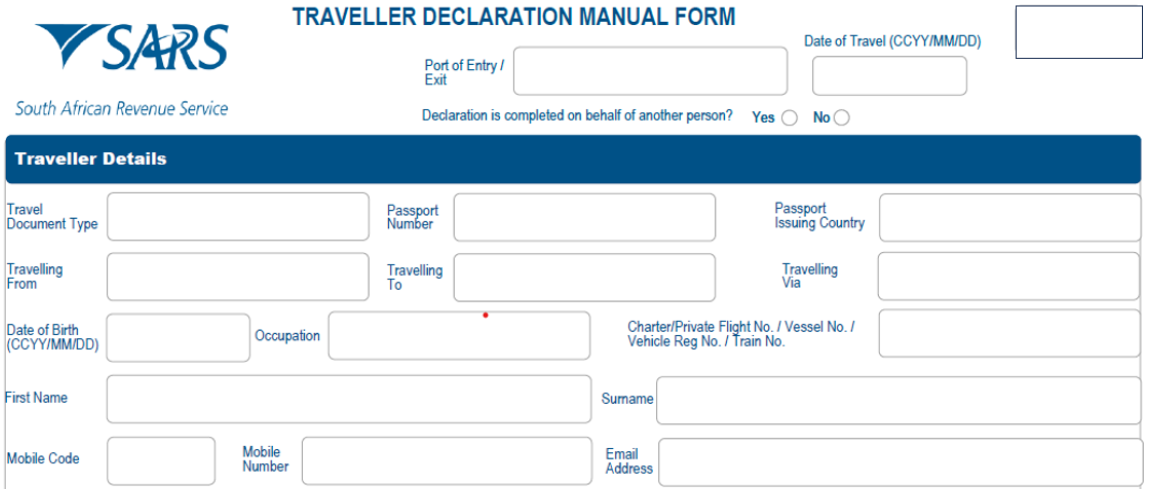
Traveller Details. The traveller enters:
- ‘Port of Entry / Exit’ – the name of the border post, airport, or seaport where you will enter or leave South Africa.
- ‘Date of Travel’ – the date you will be travelling.
- ‘Declaration is completed on behalf of another person?’ (Yes / No). Tick:
- ‘Yes’ if you are filling out this form for someone else (such as a child or dependent),
- ‘No’ if not.
- ‘Travel Document Type’ – specify the type of travel document (e.g., passport, ID).
- ‘Passport Number’.
- ‘Passport Issuing Country’ – the country that issued it.
- ‘Travelling From’ – your country of departure.
- ‘Travelling To’ – your destination.
- ‘Travelling Via’ – any countries you will transit through.
- ‘Date of Birth’ – your date of birth in the same format shown on the form.
- ‘Occupation’ – the current profession or job title.
- ‘Charter / Private Flight No. / Vessel No. / Vehicle Registration No. / Train No’ – If traveling by private means, fill in the relevant number (e.g., flight, vessel, vehicle, or train).
- ‘First Name’ as it appears on the passport or travel document.
- ‘Surname’ – as it appears in the traveller’s passport or travel document.
- ‘Mobile Code’ – country code.
- ‘Mobile Number’.
- ‘Email Address’.
South African Physical Address Details. The traveller provides the address where they will be staying in South Africa:
- ‘Unit number’.
- ‘Complex name’ (if applicable).
- ‘Street number’.
- ‘Street or Farm Name’.
- ‘Postal Code’.
- ‘Country Code’.
- ‘Suburb/District’.
- ‘City/Town’.

Travel Companion(s). The traveller enters:
- ‘First Name’.
- ‘Surname’.
- ‘Passport Number’.
- ‘Passport Issue Country’.

Reason of Visit. The traveller ticks the box that best describes their reason for travel:
- ‘Resident’
- ‘Immigrant’
- ‘Study’
- ‘Business’
- ‘Transit’
- ‘Holiday’
- ‘Diplomat’
- ‘Employment’
- ‘Crew’
- ‘Other (Specify)’.

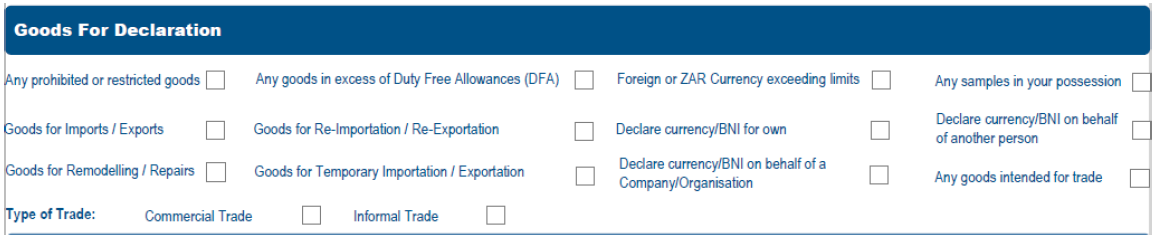
Goods for Declaration. The traveller ticks the box from the options provided:
- ‘Any prohibited or restricted goods’ – declare if you are carrying items that are not allowed or require special permits (e.g., firearms, certain medicines, plants, or animal products).
- ‘Any goods in excess of Duty-Free Allowances (DFA)’ – if the traveller has more than the allowed duty-free limits (see below), declare these goods.
- ‘Foreign or ZAR Currency exceeding limits’ – If you are carrying more than R100 000 (or equivalent in foreign currency), you must declare it. Refer to Excess Currency policy (SC-PA-01-06).
- ‘Goods for Temporary Importation / Exportation’ – declare items the traveller is bringing in or taking out temporarily (e.g., equipment for a short-term project).
- ‘Declare currency / BNI for own / on behalf of another person / on behalf of a Company/Organisation’ – indicate if you are declaring currency for yourself, someone else, or a company.
- ‘Goods for Remodelling / Repairs’ – declare items being imported/exported for repair or modification.
- ‘Any samples in your possession’ – declare commercial or trade samples.
- ‘Goods for Imports / Exports’ – Declare goods you are bringing into or taking out of South Africa.
- ‘Re-Importation / Re-Exportation’ – Declare goods temporarily taken out of or brought into South Africa that you now wish to return or remove again.
- Any goods intended for trade – If you are bringing goods for sale or trade, declare them.
- Type of Trade: Informal Trade / Commercial Trade – Specify whether your trade is informal (small-scale) or commercial (business).
- Details of Currency/BNI – State the type and amount of currency or bearer negotiable instruments (BNI), and any relevant comments.
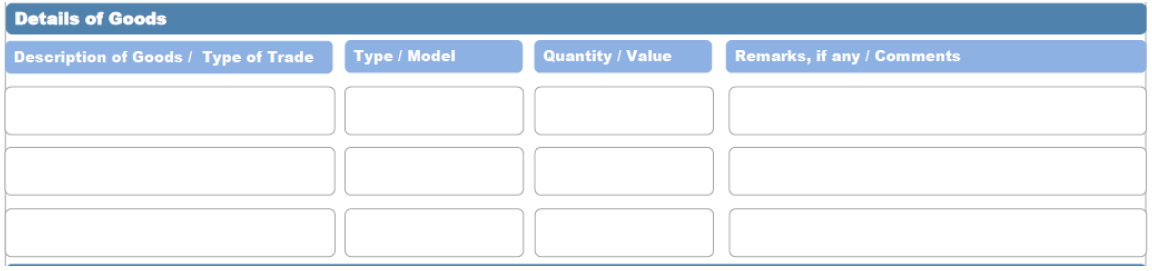
Details of Goods: The traveller enters the:
- ‘Description of Goods’ – describe each item.
- ‘Type / Model’.
- ‘Quantity’.
- ‘Comments’.
Details of Currency / BNI. The traveller enters the:
- ‘Type of Currency / Bearer Negotiable Instruments (BNI).
- ‘Amount’.
- ‘Remarks / Comments’ – any relevant comments.

Declaration. The traveller must:
- Click the radio button to declare that the information is true and correct.
- Enter ‘Date’ – the date the traveller is completing the form.
- Sign the form to confirm that all information provided is true and correct.

Declaration on behalf of another person. The person travelling with traveller must
- Click the radio button to declare that the information is true and correct.
- Enter ‘Date’ – the date the traveller is completing the form.
- Sign the form to confirm that all information provided is true and correct.

Definitions, acronyms and abbreviations
The definitions, acronyms and abbreviations can be accessed here – Glossary webpage.
Legal disclaimer: In the event of conflict or inconsistency between this webpage and the PDF version of the guide, the latter shall prevail.