
Summary
- The purpose of this webpage is to provide information regarding reporting unprofessional conduct of tax practitioners.
- This webpage also provides guidance on how to report to SARS unprofessional conduct of:
- Tax practitioners i.e. individuals who have registered with a Recognised Controlling Body (RCB) and with SARS as a tax practitioner;
- Professionals who provide tax assistance; and
- Unregistered individuals practising as tax practitioners.
- In addition, this webpage covers:
- How SARS ensures the governance of tax practitioners.
- The circumstances under which any person can report unprofessional conduct to SARS regarding another person who provides tax advice or assistance that is against the provisions of the Acts administered by SARS; and
- The procedures and actions that SARS follows and takes when reports of unprofessional conduct are received.
- The webpage also covers the completion of the form for reporting alleged unprofessional conduct, RUC001 – Reporting of Unprofessional Conduct Form.
Background
- SARS respects the right of taxpayers to obtain professional tax advice as it endorses the principle of tax self-determination. However, the need for integrity in the relationship between a tax professional and a taxpayer must be emphasised, as this relationship is of utmost importance for tax compliance. It is expected that tax practitioners, who are experts in this field, will:
- clearly outline the tax laws and obligations of taxpayers to the taxpayer;
- accurately and honestly assist taxpayers in the completion of their tax returns; and
- when appropriate, honestly and openly engage with SARS on behalf of taxpayers.
- Therefore, the role of the tax practitioners is vital to ensure compliance with tax laws.
- For this reason, the Tax Administration Act No. 28 of 2011 (the Act) in Chapter 18 provides a framework to ensure that tax practitioners are appropriately qualified and that a mechanism is available to both taxpayers and SARS, to ensure that misconduct is dealt with.
- The first leg of the framework is the compulsory registration of tax practitioners with controlling bodies, recognised by the law or SARS in accordance with certain prescribed criteria. Such recognition affords a controlling body the status of a Recognised Controlling Body (RCB) and ensures that registered tax practitioners subscribe to the Code of Conduct as well as other requirements of the RCB of which they are a member. The Code of Conduct stipulates the minimum ethical conduct requirements for RCB members as well as consequences of its contravention, including disciplinary action by the RCB against its members. This means that where a registered tax practitioner has been negligent, contravened tax law on behalf of taxpayers, or otherwise disadvantaged a taxpayer or affected their compliance levels, the taxpayer or a member of the public may report the practitioner to their RCB. As Chapter 18 provides a mechanism for SARS to report a tax practitioner to their RCB, taxpayers and the public have the option to report such unprofessional conduct to the RCB, to SARS, or to both the RCB and SARS.
- The second leg of the framework is the compulsory registration of tax practitioners with SARS. In this regard, Chapter 18 empowers SARS to decline to register or to deregister a tax practitioner if certain circumstances pertaining to the tax practitioner are applicable. Although the Chapter does not explicitly provide for taxpayers or the public to report tax practitioners in this regard, if such reports are received, SARS will, in the interest of good governance of the tax practitioner profession, investigate and take the appropriate action.
- Lastly, the above framework is supported by the Act, which makes it a criminal offence for any individual to practise as a tax practitioner without registering with both an RCB and SARS. Since the RCB and SARS have no recourse against unregistered individuals practising as tax practitioners, it is clear why it is advisable for taxpayers to use the services of registered tax practitioners only.
- The governance of tax practitioners is therefore co-regulated by both the RCB with which the tax practitioner is registered and SARS. This is in the best interest of taxpayers, as tax practitioners can be held accountable by a higher authority.
Governing Legislation
- The registration of tax practitioners and reporting of unprofessional conduct are regulated by Chapter 18 of the Tax Administration Act (sections 239 to 243). These sections are discussed below.
Section 239 : Definitions
- Defined meanings of terms in section 1 of the Act are applicable throughout the Act unless the context indicates otherwise. However, there are also chapters and parts of the Act that contain defined terms, the definitions of which only apply to the respective chapter and part in which they appear in single quotation marks. Chapter 18 is one such Chapter.
- The chapter differentiates between controlling bodies and Recognised Controlling Bodies (RCBs). A controlling body is “a body established, whether voluntary or under law, with power to take disciplinary action against a person who, in carrying on a profession, contravenes the applicable rules or Code of Conduct for the profession”. Although undefined in this section, as discussed under section 240A below, a RCB is a body recognised by SARS or the legislation that exercises control over members who provide the services listed in section 240. The chapter enables SARS to report the unprofessional conduct of the members of both controlling bodies and RCBs.
Section 240: Registration of Tax Practitioners
- Subject to exclusions set out below, every natural person must register as a tax practitioner with both SARS and an RCB if they charge a taxpayer a fee (including a percentage of a possible refund) to:
- provide advice with respect to the application of a tax Act;
- complete a tax return on behalf of the taxpayer; or
- assist the taxpayer in completing their return.
- This duty does not apply to a person who only:
- provides the above services:
- for free;
- as part of their job; or
- under the supervision of a registered tax practitioner, in which case the tax practitioner is accountable for the actions of this person.
- provides advice for the purposes of litigation involving SARS; or
- provides other goods or services and the advice is incidental or subordinate to providing these goods or services. This would include estate planners, financial advisors, and brokers. However, as these types of professionals are as a rule required to belong to a controlling body, their unprofessional conduct can be reported as set out in this Guide.
- provides the above services:
- A person may not register as a tax practitioner or SARS may deregister a registered tax practitioner:
- if a controlling body has revoked their membership for serious misconduct within the last five years;
- if they have been convicted of any serious tax offences or offences involving dishonesty within the last five years;
- during the period that they are being prosecuted for a serious tax offence; or
- if they are not tax compliant during the preceding 12 months for an aggregate period of at least six months.
- If prosecution for a serious tax offence has been instituted but not finalised against a person or registered tax practitioner and if the person or registered tax practitioner continues with the commission of a serious tax offence after the criminal proceedings have been instituted, a senior SARS official may:
- not register the person as a registered tax practitioner; or
- suspend the registration of the registered tax practitioner,
- for the duration of the criminal proceedings commencing on the date that prosecution is instituted and ending on the date that the person or registered tax practitioner is finally acquitted.
- Taxpayers who have information that SARS should not register a person as a tax practitioner or should deregister or suspend a registered tax practitioner can report this as set out in this Webpage.
Section 240A: Recognition of Controlling Bodies
- There are two categories of RCBs namely:
- Statutory bodies recognised by the Act; and
- SARS Commissioner recognised RCBs.
- A full list of RCBs can be accessed on the SARS website by clicking on Controlling Bodies for Tax Practitioners | South African Revenue Service.
- In addition, to cater for controlling bodies that lack the capacity or willingness to adequately deal with complaints about members by SARS, the Minister of Finance is empowered to appoint a panel of retired judges or persons of similar stature and competence to hear these complaints on behalf of an association. The costs of the appointment will be borne equally by the association and SARS.
- It is clear from the above that the legislation provides a framework to ensure that tax practitioners are appropriately qualified and that misconduct can be dealt with. It demonstrates that it is in the utmost interest of all taxpayers to procure the services of registered tax practitioners only. Taxpayers can verify that the professional that they are using is a registered tax practitioner on the SARS eFiling website on this link https://secure.sarsefiling.co.za/TaxPractitionerQuery.aspx. Taxpayers are encouraged to verify the registration of their tax practitioners.
- Unregistered individuals practising as tax practitioners are not accountable to an RCB that can ensure that they are appropriately qualified and behave professionally and ethically. The only recourse that SARS and a taxpayer have regarding such a person is to lay a criminal complaint with the South African Police Service. Taxpayers who have complaints about unregistered individuals practising as tax practitioners or who become aware that the person assisting them with their tax matters is unregistered can send their complaint by following the steps on Reporting the unprofessional conduct of a Tax Practitioner (Section 241) | South African Revenue Service.
Section 241: Complaint to Controlling Body
- In consideration of the definition replicated in the discussion on section 239 above, a member of a controlling body could include a medical professional, a teacher, an estate agent, veterinarian, or any member of a profession that is required to belong to a governing body. However, it is more likely that a taxpayer will obtain tax advice or assistance as a by-product of consulting with insurance brokers, estate planners, financial advisors, brokers, registered auditors, and the like. Although these professionals are not required to register as tax practitioners (see discussion on section 239 and 240), SARS may still lodge a complaint with their controlling body if they did or omitted to do anything with respect to their own affairs or that of a taxpayer. SARS may lodge a complaint if SARS is of the opinion that action of the professional:
- was intended to assist or through negligence resulted in the taxpayer avoiding or unduly postponing the performance of a tax obligation;
- contravenes the rules or code of conduct for the profession to which they belong that may result in disciplinary action being taken against them by their controlling body; or
- constitutes unprofessional conduct by a registered tax practitioner as set out below.
- As the skill set of a registered tax practitioner is focused on tax advice and assistance specifically, circumstances under which SARS may lodge a complaint with an RCB. Such circumstances include that a registered tax practitioner has –
- prepared or assisted in preparing, approving, or submitting any tax returns, affidavits or other tax related documents without exercising due diligence;
- unreasonably delayed the finalisation of any matter before SARS;
- given a tax opinion recklessly or contrary to clear law or has displayed gross incompetence through the tax opinion that they have given;
- been grossly negligent regarding any work performed as a registered tax practitioner;
- knowingly given or participated in giving false or misleading information in connection with tax matters; or
- directly or indirectly tried to threaten, falsely accuse, place under duress, coerce, or bribe a SARS official regarding any tax matter.
Section 242: Disclosure of Information regarding Complaint and Remedies of Taxpayer
- Although taxpayer information is strictly protected, it follows that to enable SARS to lodge complaints with either controlling bodies or RCBs it may have to disclose some taxpayer information as is necessary to substantiate the complaint.
- However, before a complaint is lodged, SARS must notify both the taxpayer concerned and the tax practitioner against whom the complaint is levelled and either or both may object to the disclosure of the information, or the lodging of the complaint within 21 business days.
- If no objection is lodged or the objection is not sustainable in SARS’s view, the complaint may be lodged.
Section 243: Complaint considered by Controlling Body
- A controlling body or RCB must consider the complaint according to its rules.
- However, where details of the tax affairs of the taxpayer (whether provided by SARS or obtained by the body) will be disclosed at a hearing, such hearing may only be attended by persons who the body deems necessary to consider the complaint properly.
- The body and its members must also preserve the secrecy of this information and must not communicate the information to anyone other than the taxpayer or the tax practitioner involved, unless disclosure is ordered by a competent court of law.
How can a Person Report Unprofessional Conduct
- Any person may report the unprofessional conduct of a registered tax practitioner or a professional who provides services which incorporates tax advice and assistance.
- To report such conduct, form ‘RUC001 – Reporting of Unprofessional Conduct’ must be completed in full.
Note: Certain information fields are mandatory and if not completed will result in the automatic rejection of the complaint.
- This complaint form can be obtained through the following channels:
- The SARS website Reporting the unprofessional conduct of a Tax Practitioner (Section 241) | South African Revenue Service
- The SARS Contact Centre on 0800 00 7277
- At a SARS branch
Completion of RUC001 Form
Details of Complainant
Personal Details
- These are the personal details of the complainant.

- Complete the following personal details of the complainant:
- Surname
- Initials
- First Two Names
- Are you a South African Citizen?
- If “Y” – enter your ID No.
- If “N” – enter your Passport No.
Note 1:
- The ID No. field is only mandatory if “Yes” is ticked for the field “Are you a South African Citizen?”
- If an incorrect ID No. is entered, the following message will appear, “The ID No. you have entered does not seem to be valid. Please ensure that it is correct.”
- The Passport No. is only mandatory if “No” is ticked for the field “Are you a South African Citizen?”
- The Passport No. is not validated for correctness.
- Taxpayer Reference No.
- This field is not mandatory.
- This is the registration number that a taxpayer obtains from SARS when registering for tax and must be the reference number for Income Tax.
- This field is validated for correctness if captured.
- If an invalid Taxpayer Reference No. is captured the following message will appear, “The Income Tax Ref No. you have entered does not seem to be valid. Please ensure it is correct”.
- Are you a SARS employee?
- If “Y” – The container for capturing the details of the Line Manager will be opened.
- If “N” – Complete the contact details of the complainant in the next container.
Contact Details
- These are the contact details of the complainant.

- Complete the following contact details of the complainant:
Note 1: The field for the email is not mandatory.
Note 2: The email address is validated to confirm that it contains an “@” sign and .domain at the end. If not, the following message will appear, “The email you have entered does not seem to be valid. Please ensure it is correct”.
- Cell No.
- Bus Tel No.
- Home Tel No.
- Fax No.
Note 3: At least one telephone or fax number must be completed.
Note 4: These fields are validated for length.
Note 5: If a number of an invalid length is captured the following message will appear, “The XXX No. you have entered does not seem to be valid. Please ensure it is correct”.
Line Manager Details
- These are the details of the Line Manager which are mandatory only if you are a SARS employee.

- Complete the following details of the Line Manager:
- Surname
- Initials
- SPID
Note 1: SPID is validated to ensure that only numeric digits are captured.
- Designation
Note 2: The email address is validated to confirm that it contains a @ sign and .domain at the end. If not, the following message will appear, “The email you have entered does not seem to be valid. Please ensure it is correct.”
- Cell
- Bus Tel No.
Note 3: All the above fields are mandatory.
Note 4: Tick the box next to the wording, “I hereby confirm that my line manager is aware of this complaint (tick to confirm)” to confirm that the Line Manager has approved the submission of the complaint.
Details of Taxpayer

- Are the details of the taxpayer the same as that of a complainant?
- If “Y” – Proceed to the “Details of Tax Practitioner” container.
- If “N” – The container for “Details of Taxpayer” will be opened.
Personal Details
- These are the personal details of the taxpayer.
- This section must only be completed if the details of the taxpayer are different from the details of the complainant.

- Complete the following personal details of the taxpayer:
- Surname
- Initials
- First Two Names
Note 1: Only the fields for the surname and names are mandatory.
- Taxpayer Reference No.
Note 2: This is the registration number that the taxpayer obtains from SARS when registering for tax, which can be a reference number for any tax type.
Note 3: Completion of this field is not mandatory.
- ID No.
Note 4: Completion of the ID No. is not mandatory.
Note 5: The ID No. is validated for correctness. If an incorrect identity number is entered, the following message will appear, “The ID No. you have entered does not seem to be valid. Please ensure that it is correct.”
Entity Details
- These are the details of the taxpayer who is a juristic person.
- These details must only be completed if applicable.

- Complete the following details of the taxpayer:
- Registered Name
Note 1: This is the name under which the taxpayer is legally registered with the Companies and Intellectual Property Commission (CIPC).
- Trading Name
Note 2: This is the name under which the taxpayer trades or by which it is generally known to its customers.
- Taxpayer Reference No.
Note 3: This is the registration number that the taxpayer obtained from SARS when registering for tax, which can be a reference number for any tax type.
- Company /CC/Trust Registration No.
Note 4: This is the registration number that a company, close corporation, co-operative, or trust obtains when it registers with CIPC or the Master of the High Court for a trust.
Note 5: Completion of this section is not mandatory.
Contact Details
- These are contact details of the taxpayer.
- These details must only be completed if applicable.

- Complete the following contact details of the taxpayer:
- Cell No.
- Home Tel No.
- Bus Tel No.
- Fax No.
Note 1: Completion of the above fields is not mandatory.
Details of Tax Practitioner
Personal Details
- These are the personal details of the Tax Practitioner. If your complaint involves an unregistered individual practising as a tax practitioner, please “Report Tax Crime” by following this link.
- Complete as many details as possible.

- Complete the following personal details of the tax practitioner:
- Surname
- First Name
Note 1: Only the Surname and the First names of the Tax Practitioner are mandatory.
- Other Name
- Initials
- Date of Birth
- ID No.
Note 2: The other fields are not mandatory.
Contact Details
- These are the contact details of the Tax Practitioner.
- These details must only be completed if applicable.

- Complete the following fields:
- Cell No.
- Home Tel No.
- Bus Tel No.
- Fax No.
Note 1: Completion of the above fields is not mandatory.
Business Address Details
- This is the physical address of the business from which the tax practitioner operates, i.e. the premises the tax practitioner’s business is trading from.

- Complete the following fields:
- Unit No.
- Complex (if applicable)
Note 1: If the business is trading from a flat or townhouse, the actual flat or townhouse unit number must be inserted in “Unit No.” field.
Note 2: The name of the block or the block of flats or townhouse complex must be inserted in “Complex” field.
Note 3: Where the business does not trade from a flat, townhouse or complex these fields are left blank.
- Street No.
- Street/Farm Name
- Suburb/District
- City/Town
- Country Code
Note 4: The “Country Code” field is a drop-down list containing valid country names. The pop-up also contains two buttons: “Ok” and “Cancel”. If a country has been selected and the “Ok” button is clicked, then the selected country code will be displayed in the field. If the “Cancel” button is clicked, the pop-up will close.
- Postal code
Note 5: Completion of this section is not mandatory.
Postal Address Details
- This is the postal address details of the tax practitioner being reported.
- This section requires completion in cases where the postal address differs from the business address above.

- Mark here with an “X” if same as the business address or complete your Postal Address.
- If this address is the same as the business address above, simply mark the relevant box with an “X”.
- If not, complete the fields below.
- Complete the following details of the tax practitioner in the Postal Address fields:
- Postal Agency or Other Sub-unit (if applicable) (e.g. Postnet Suite ID)
- PO Box: Indicate on the applicable tick box if the postal address is ‘P.O. Box’ or ‘Private Bag’
- Private Bag: Indicate on the applicable tick box if the postal address is ‘P.O. Box’ or ‘Private Bag’
- Other PO Special Service (specify)
- Number
- Post Office
- Postal Code
- Registered Postal Address indicator
Note 1: Completion of this section is not mandatory.
Other Details
- This container contains additional details.
- These details must only be completed if applicable.

- Complete the following fields:
- Practitioner Website
- Practice Name or Firm Name
- Recognised Controlling Body (RCB)
- Tax Practitioner Registration No.
- City/Town in which the Practitioner Operates
- Taxpayer Reference No.
- Province in which the Practitioner operates
Note 1: Completion of this section is not mandatory.
Nature and Details of Complaint
Additional Details of Complaint
- Describe the complaint that is being lodged against the specific tax practitioner.
Note 1: This section is mandatory.
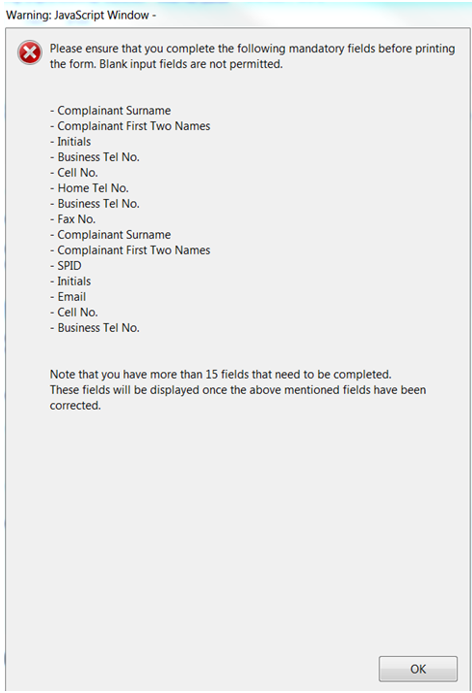
Note 2: If the complainant prints or emails the RUC001 form without completing the mandatory fields, the following pop-up message will be displayed:
Submission of the Form
- After capturing the form, the complainant may want to recapture, save or submit the form.
- The following buttons/options must be used to execute the required action:

- Click “Print Blank Form” where you want to complete the form manually.
- Click “Reset” to clear and restart capturing the form.
- Click “Print Form” to print a completed form to a local printer.
- Click “Email Form” to email the form:
- Select “Desktop Email Application” if you use an application such as Microsoft Outlook, Eudora or Mail. This will send the form to the Tax Practitioners Unit email address [email protected]; or
- Select the option “Internet Email” if you use an Internet email service such as Yahoo or Microsoft Hotmail. In this case, you will need to save the form and submit it manually to [email protected].
Note 1: The complainant may use the save button to save a completed form on their desktop.
Declaration
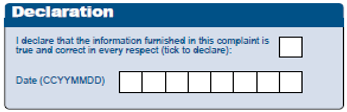
- The complainant must tick the question on the declaration and complete the date in the required format.
Note 1: Ticking of the declaration is mandatory.
Definitions, acronyms and abbreviations
The definitions, acronyms and abbreviations can be accessed here – Glossary webpage.
Legal disclaimer: In the event of conflict or inconsistency between this webpage and the PDF version of the guide, the latter shall prevail.