
For an archive on RLA updates, click here.
What’s New
What is RLA?
Registration, Licensing and Accreditation (RLA) is the new electronic platform for the management of Customs registration/licensing applications. The new electronic registration, licensing and accreditation process is being implemented under the provisions of the Customs and Excise Act, no 64 of 1964. Clients wishing to register as an importer/trader should capture their details on the RLA eFiling platform.
Where a client has made use of the electronic RLA process to register, there is no need to complete or submit the DA 185 form and its supporting documents. Therefore, the DA 185 forms and supporting annexures should be used for reference during the application process for Customs purposes as it provides important information that will support the Customs application process.
However, the following Customs clients must still use the manual process and complete the respective DA 185 and submit it with the supporting annexures to their nearest Customs Branch Office:
- Deferment
- Consignor
- Drawbacks.
Kindly note that registration and licensing of all Excise activities are also still manual. Therefore the manual DA 185 application as well as supporting annexures and documents must be completed and submitted for Excise to their nearest Branch office. The links to the manual DA185 forms to be completed are listed below.
How to apply for Registration, Licensing and Accreditation?
Go to eFiling on www.sarsefiling.co.za and register or login.
Follow these easy steps on eFiling:
- If you have not done so yet, link to the organisation profile to your individual profile
- Assign RLA user rights and roles
- Capture the RLA client application
- Submit the application:
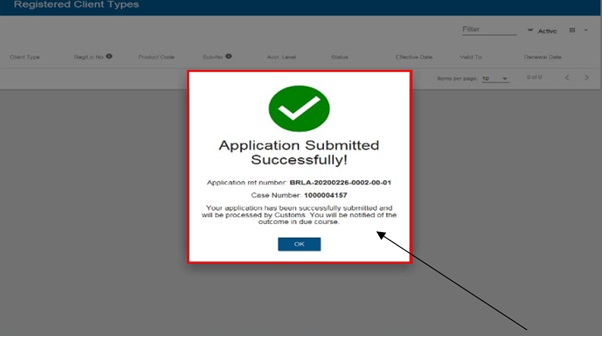
To see the detailed steps and screens, see the SC-CF-42 – Customs Trader Portal – External Guide.
Or see our tutorial video on How to access Customs registration, Licensing and Accreditation on SARS eFiling.
To monitor the status of your application, keep an eye on your eFiling inbox.
How to upload RLA supporting documents?
In addition to the automated application process above, you can also upload supporting documents through the SARS Online Query System (SOQS), see Upload/submit Registration, Licensing and Accreditation-related supporting documentation.
The following documents as proof of address or contact details are required:
- A municipal account, fixed line telephone or cellular phone account or any other monthly account or statement (for example, if appropriate in the circumstances, a co-operative statement for farmers, medical aid statement, mortgage statement, SABC television licence documents, eToll account, major retail accounts) issued to the applicant that can confirm physical address of the applicant, if the applicant is located in the Republic.
- A telephone or cellular phone account issued to the applicant to confirm the applicant’s telephone or cellular phone contact details.
- If the above documents are not in the name of the applicant a commissioned affidavit is required to support the supplied documents.
How to view RLA certificates and letters?
Also through the online SOQS system you can view and download Registration, Licensing and Accreditation certificates and letters; and choose to receive them via email.
How to apply to become an Authorised Economic Operator (AEO)?
The process to apply for accreditation is also automated, see the Authorised Economic Operator webpage for more information.
How to submit a Surety/Bond?
During the application process a client may be required to provide a surety/bond. A bond is an agreement where the guarantor (issuer of the surety) commits to paying any debt owed to SARS by the registrant or licensee if they do not meet their obligations as outlined in the surety bond. To see how to submit, see the Registration and cancellation of Bonds webpage.
Need help the RLA process on eFiling?
For enquiries and submissions:
- If clients are experiencing technical issues to access RLA on eFiling or submitting an application, please call the SARS Contact Centre on 0800 00 7277.
- Alternatively, clients can submit applications for a Customs client number in person at the following Customs Branch offices:
- Alberton: SARS Alberton Campus
- Cape Town: 22 Hans Strijdom Avenue, Central, Cape Town
- Durban: 201 Dr Pixley Kaseme Street Durban
- ORTIA: 1st Floor Agents Building, Cargo Section, OR Tambo International Airport
- Port Elizabeth: SARS Customs Branch, 3 Winston Ntshona Street, Sanlam building, Port Elizabeth.
- Pretoria: 136 Francis Baard Street, Customs House, Pretoria
Still need help with Registration and Licensing applications?
The manual DA 185 – Application form – Registration and licensing of Customs and Excise Clients – External Form, the relevant annexes and the supporting documents listed in the application form is still available for certain client types and must be submitted to the nearest Customs office for processing. For more information on the required supporting documents, see Legal Entity – External Standard. The applicant or the applicant’s representative (Public Officer) as per the application form must also provide his / her ID book, proof of address and contact details to the Branch Front End agent.
Please note that the applications submitted to the below email addresses will be not processed as these email addresses are reserved for queries only. Applications must be submitted via e-filing or in person at a SARS branch office. Should you experience issues during submission, please direct your queries to [email protected] , and for bond‑related matters only, contact [email protected]
List of manual DA 185 forms
The following list of manual forms are applicable to all Excise registration and licensing as well as the following Customs clients, to be submitted with the supporting annexures to your nearest Customs Branch Office:
- Deferment
- Consignor
- Drawbacks.
List of manual forms still used for Excise and some Customs clients as described above:
- DA 185 – Application form – Registration or Licensing of Customs and Excise Clients – External Form
- DA 185 4A10 – Registration Client Type 4A10 – Manufacturer in terms of drawback item 501 00 to 521 00 of Schedule 5 – External Annexure
- DA 185 4A12 – Registration Client Type 4A12 – Electricity producer (Chapter VA and section 59A and the rules thereto 54FA 04) – External Annexure
- DA 185 4A14 – Registration Client Type 4A14 – Registered still – External Annexure
- DA 185 4A15 – Registration Client Type 4A15 – Manufacture of excisable goods solely for own use – External Annexure
- DA 185 4A16 – Client Type 4A16 – Non-commercial manufacturer of sugary beverages (Section 59A and Rule 54I 03) – External Annexure
- DA 185 4A17 – Registration Client Type 4A17 – Tobacco Leaf Dealer – External Annexure
- DA 185 4A18 – Registration Client Type 4A18 – To be in possession and use goods consisting of a mixture which includes marked goods (S37A(9) R37A 12) – External Annexure
- DA 185 4A19 – Registration Client Type 4A19 – Supply of aviation kerosene and or aviation spirit (Items 460 05 or 496 00 or 623 11 or 671 01) – External Annexure
- DA 185 4A2 – Registration Client Type 4A2 – Exporter (Located or not located in the Republic) – External Annexure
- DA 185 4A20 – Registration Client Type 4A20 – Producer of goods not capable of use in any engine (Section 37A(4) and Rule 37A 11) – External Annexure
- DA 185 4A21 – Registration Client Type 4A21 – Seller of Eligible Purchases of Distillate Fuel to Diesel Refund Users (Part 3 of Schedule 6) – External Annexure
- DA 185 4A22 – Registration Client Type 4A22 – Diesel Refund User under the Diesel Refund Scheme (Part 3 of Schedule 6) – External Annexure
- DA 185 4A3 – Registration Client Type 4A3 – Rebate or Refund User (Schedules 3 4 and 6) – External Annexure
- DA 185 4A4 – Registration Client Type 4A4 – Manufacturer – External Annexure
- DA 185 4A5 – Registration Client Type 4A5 – Special manufacturing warehouse – Automotive Production and Development Programme (APDP) – External Annexure
- DA 185 4A7 – Registration Client Type 4A7 – Producer – External Annexure
- DA 185 4A9 – Registration Client Type 4A9 – Non-commercial Manufacturer of Biofuel (Section 37B and Rule 37B 02(a)) – External Annexure
- DA 185 4B1 – Licensing Client Type 4B1 – Special Manufacturing Warehouse – External Annexure
- DA 185.4B10 – Licensing Client Type 4B10 – Licensing of manufacturing warehouse in CCA – External Form
- DA 185.4B11 – Licensing Client Type 4B11 – Distillation of spirits by an agricultural distiller – External Form
- DA 185.4B12 – Licensing Client Type 4B12 – To own, possess or keep stills – External Form
- DA 185.4B13 – Licensing Client Type 4B13 – To manufacture or import stills for sale or repair stills – External Form
- DA 185.4B14 – Licensing Client Type 4B14 – Degrouping depot – External Form
- DA 185.4B15 – Licensing Client Type 4B15 – Searcher of or searching for wreck – External Form
- DA 185.4B16 – Licensing Client Type 4B16 – Container depot – External Form
- DA 185.4B2 – Licensing Client Type 4B2 – Manufacturing warehouse – External Form
- DA 185.4B9 – Licensing Client Type 4B9 – Storage warehouse – External Form
- DA 185.C – Security particulars – External Form
- SC-CF-19-A01 – Documentary Requirements – External Annexure
- SC-CF-19-A02 – Facilities Code List – External Annexure
- SC-CF-19-A03 – Exemption from Ad Valorem Excise Licence and Payment – External Annexure
- SC-CF-19-A04 – Joint Ad Valorem Excise Licence – External Annexure
- DA 185 4A1 – Registration Client Type 4A1 – Importer (Located or not located in the Republic) – External Annexure
- DA 185.D – Disclosure of registered agent – External Form
- DA 8 – Application for registration to submit reporting documents for sea cargo – External Form
- DA 8A – Application for registration to submit reporting documents for air cargo – External Form
- DA 8B – Application for registration to submit reporting documents for rail cargo – External Form
- DA 8C – Application for registration to submit reporting documents for road cargo – External Form
- VAT215 – Record in respect of Imported Services – External Form
Customs Clients wishing to apply for Exporter registration as a Local Exporter complete the following DA185 forms because they can only make use of the manual application process:
- DA 185 – Application form – Registration and licensing of Customs and Excise Clients – External Form
- DA 185.4A2 – Registration Client Type 4A2 – Exporter (Located or not located in the Republic) – External Form
- DA 46A1 02 – Exporters application for registration for the purposes of AGOA – External Form
- DA 46A2 01 – Exporters application for Registration for the purposes of the GSP – External Form
- DA 49A 02 – Application for approved exporter status – External Form
Customs Clients wishing to apply for Exporter registration under Preferential Trade Agreements complete the following DA185 forms because they can only make use of the manual application process:
SADC/TDCA/SACU-EFTA
- DA 185 – Application form – Registration and licensing of Customs and Excise Clients – External Form
- DA 185.4A2 – Registration Client Type 4A2 – Exporter (Located or not located in the Republic) – External Form
- DA 185.4A7 – Registration Client Type 4A7 – Producer – External (Form)
AGOA
- DA 185 – Application form – Registration and licensing of Customs and Excise Clients – External Form
- DA 185.4A2 – Registration Client Type 4A2 – Exporter (Located or not located in the Republic) – External Form
- DA 46A1 02 – Exporters application for registration for the purposes of AGOA – External Form
- DA 185.4A4 – Registration Client Type 4A4 – Manufacturer – External Form
GSP
- DA 185 – Application form – Registration and licensing of Customs and Excise Clients – External Form
- DA 185.4A2 – Registration Client Type 4A2 – Exporter (Located or not located in the Republic) – External Form
- DA 46A2 01 – Exporters application for Registration for the purposes of the GSP – External Form
These are the forms needed to be an approved Exporter in TDCA & SACU-EFTA:
- DA 185 – Application form – Registration and licensing of Customs and Excise Clients – External Form
- DA 185.4A2 – Registration Client Type 4A2 – Exporter (Located or not located in the Republic) – External Form
- DA 49A 02 – Application for approved exporter status – External Form